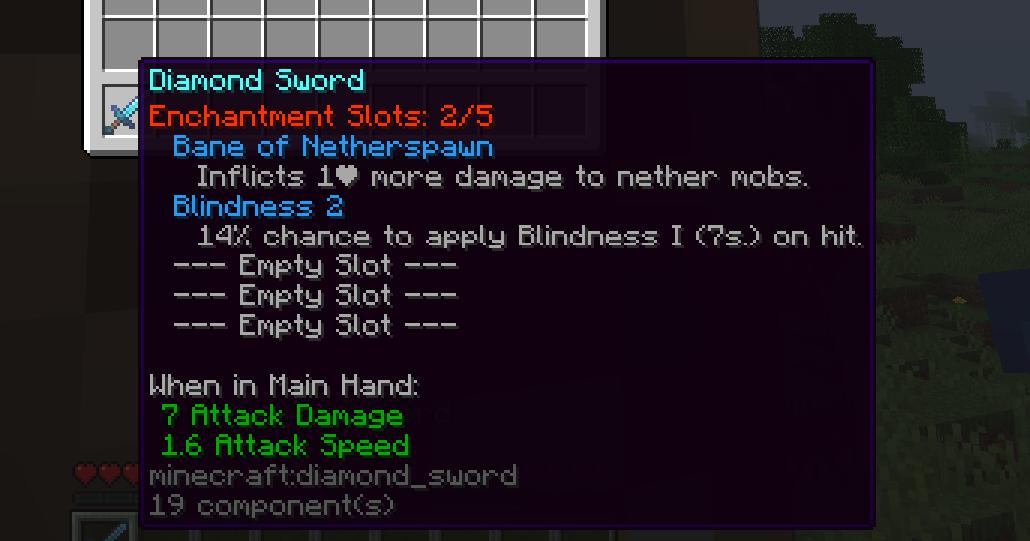
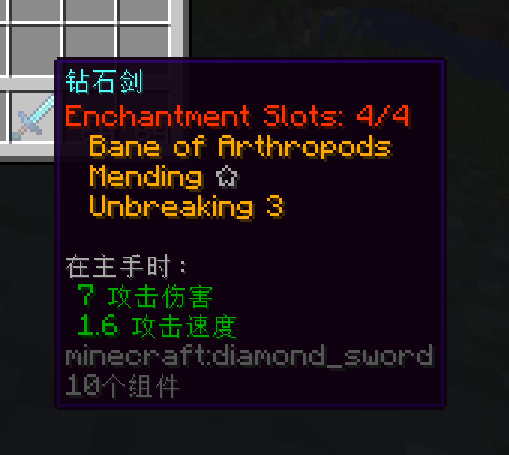
# 🎉Welcome
## Links
### Get the plugin
**SpigotMC:** [PREMIUM](https://www.spigotmc.org/resources/enchantmentslots-add-enchantment-slot-feature-to-your-server-1-14-1-21-11.113048/)
**Polymart:** [PREMIUM](https://polymart.org/product/4295/enchantmentslots)
**BuiltByBit:** [PREMIUM](https://builtbybit.com/resources/enchantmentslots.32808/)
### Get support
* All users have an obligation to comply with our rules after joining the Discord server, which can be viewed in the rules channel. If you do not agree with our rules, you will not be able to receive our service support. Users who violate the rules will be punished according to the situation, including permanent ban.
* Every user is obligated to comply with our plugin terms of use. You can find these in the **LICENSE** file within the JAR file. We do not provide any assistance to users who fail to comply with the terms of use.
* Compared to users who have purchased the paid version, our service support priority for free users will be lower, with more requirements and restrictions. I have invested a lot of time and effort in developing plugins, but despite this, I have provided the complete plugin source code. I have not closed the source or restricted the number of user IP addresses used. Therefore, better service support is not free, and you should not ask me to provide good service for free. If you want your issue to be taken seriously, please consider purchasing a paid version to support plugin development.
* Support is only available at our [Discord](https://discord.gg/rzajeybhbw) server.
* 因 Discord 在中国大陆区域不可用,如果您在中国大陆购买了此插件,可以凭购买的账号平台、名称,在此QQ群享受售后服务:815351827。
## Info
EnchantmentSlots helps you add enchantment slot in your server. All weapons, tools, armors will have a new attribute: enchantment slot. Players can only enchant a maximum of enchantment slot value enchantments to an item. This will help your server avoid player has too many enchantments and break the PvP or PvE balance.
## Features
* Packet based, your server won't get the lore we added, only client will display it, this means we compatibility with most item plugins.
* Even support creative mode!
* Auto lore update. Support all existed items, even item exist before install this plugin.
* Support other real enchantments plugins, like EcoEnchants, ExcellentEnchantments.
* AdvancedmentEnchantments and EpicEnchants are not real enchantment plugin, so this plugin won't work for them.
* Built-in condition system, you can make ranked players have more default enchantment slots.
* Can set different item has different enchantment slot, support third-plugin item, vanilla item, and even MMOItems's tier!
* Support enchant in EnchantGui plugin.
* Players can use extra slot item to make their item have more enchantment slots. (Support custom texture with custom-model-data)
* Can set add-slots, chance, apply-items, success-actions and fail-actions in it.
* Set black rules, make specified items won't display enchantment slot lore but still has enchantment slot feature!
* Add 4 placeholders which can also display enchantment slots info in other item plugins!
* Do not perfectly support other packet-based plugin, like EcoItems.
* PlaceholderAPI support, can use our expansion to display main hand item's empty slot amount and max slot amount.
* Auto remove illegal extra enchantments.
* We can only forbidden add enchantments by vanilla ways, like enchanting table and anvil.
* We can't forbid add enchantments by other way, for example, buy enchant in shop plugin, they will directly change the item enchant without calling an event. This feature will remove the extra enchantments by those illegal ways.
# ✅Requirements
## Java Version
* Basic Requirement: **Java16+**
* **Java 17+** is recommended. Java17 and above versions are recommended, but plugins are compiled using **Java16**, so theoretically, you only need Java16 or higher versions.
## Server Software
| Server | Can work in your server | Can get offical support |
| --------------- | ------------------------------------------------------------------------------------------------------------------------- | ------------------------------------------------------------------------------------------------------------------------------------------------------------------------------------------------ |
| Spigot |
✅ Some features does not provide in Spigot servers
| ✅ |
| Paper/Purpur |
✅ Can provide subtle performance improvements.
| ✅ |
| Folia |
❓ Any problems only occurs in Folia servers may not be solved. Plugin is not designed for multi thread support.
|
❓
Folia's support is in the early testing stage and may be released in official versions or removed in the future. This support is not a guarantee.
|
| Other softwares | ❌ | ❌ |
## Plugin Requirements
* For version below 4.4.0 = latest **dev** version of **ProtolcolLib** or **eco** is **required if you want to display enchantment slot lore at item**.
* For version 4.4.0+ = **Require latest Packetevents or eco!**
## Server Version
| Version | Can work in your server | Can get offical support |
| -------------------- | ------------------------------------------------------------------------------------------------------------------------- | ----------------------- |
| **Below 1.14** | ❌ | ❌ |
| **1.14 \~ 1.20.4** |
❓ The plugin can run on these versions, however, any issues caused on these versions will not be resolved.
| ❌ |
| **1.20.5 and above** |
✅ Using versions 1.21.5 and above is the most recommended, as you can enjoy the best features.
| ✅ |
* If you encounter errors while using a certain version, please join our Discord feedback.
# ⚙️Install
## Install
* Put the `.jar` file into your server's `plugins` folder.
* Stop your server and then restart it. Cannot load plugins in any other way while the server is starting.
* When updating plugins, please be sure to remove old versions.
* You should install one of the follow plugin in your server to make EnchantmentSlots display lore in your server.
* eco ()
* packetevents [(](https://modrinth.com/plugin/packetevents))
* EnchantmentSlots is not a drag-to-use plugin, you maybe need carefully adjust the options provided by the plugin to better utilize the EnchantmentSlots on your server.
* If you plan to use other custom enchanting plugins on your server, you need to follow the additional steps prompted below.
## Hide Enchantment Description
* The best way is check if the custom enchantment plugin has this feature.
### EcoEnchants
If you want to hide enchantment description lore provided by EcoEnchants, you have to:
* Disable `display.enabled` option in EcoEnchants's `config.yml`.
### ExcellentEnchants
If you want to hide enchantment description lore provided by ExcellentEnchants, you have to:
* Keep `use-listener-plugin` option to `packetevents` as this plugin is also trying use this plugin.
* Keep `packet-listener-priority` option to `LOWEST`, do not change it to other value, othervise ExcellentEnchants will still try display it's enchantment description.
* If the custom enchantment plugin doesn't has, you can use enable `auto-hide-enchants` option in each item slot settings file. After enable, EnchantmentSlots will auto add **HIDE ENCHANTS** flag to the item new generated in player inventory. Existed item can be converted by click it in player inventory. For more info, please view [this page](/enchantment-slot/item-slot-settings).
* Sometimes change `packet-listener-priority` option maybe work if the enchantment plugin is also packet based on same packet listener plugin that EnchantmentSlots using.
* If this still does not work for you, then you have to ask cutom enchantment author add this feature for you, EnchantmentSlots can do nothing for this.
# ⛔Limitation
## eco limitations
Some options does not work when you are using **eco** as packet listener plugin, but ~~**eco** has better performance than **ProtolcolLib**~~** (plugin no longer support ProtolcolLib and use packetevents instead)**, choose one of them that meet your requirement.
## Use Item Placeholder in Creative Mode
Items includes **Item Placeholder** will no longer be updated after you swap the gamemode into creative mode, and this feature does not work in creative mode. In the creative mode, the enchantment slot lore added by the plugin will still works normally.
## Compatibility of other packet based item plugins
Some other item plugins and enchantment plugins **MAY** are also using packet to change items, in which case EnchantmentSlots's **enchantment slot lore** may not work on items from these plugins.
## Won't work for fake custom enchantment plugin
EnchantmentSlots does **NOT** support **fake custom enchantment plugins**. The simplest way to determine if your enchantment plugin is a fake custom enchantment plugin is to use the `/enchant` command. If this command introduces the new enchantments in your custom enchantment plugin, then your custom enchantment is real. Otherwise, they are just fake custom enchantment plugins that provide similar functionality.
Confirmed real custom enchantment plugin that EnchantmentSlots supports:
* EcoEnchants
* ExcellentEnchants
* MythicEnchants
# 🔗Compatibility
## **Direct compatibility**
### Directly supported custom enchantments plugins list
EnchantmentSlot can automatically obtain information such as the **name, sort** and **rarity** of newly added enchants from these enchantment plugins. Otherwise, you need to set a custom enchantment name in the `enchant-name` section of `config.yml`.
* EcoEnchants
* ExcellentEnchants
* Aiyatsbus
* EnchantmentReform
### Directly supported custom items plugins list
EnchantmentSlot can automatically obtain the IDs of items from these plugins, so that you can set different [**default slots** and **max slots**](/enchantment-slot/item-slot-settings) for items from these plugins separately, even if their materials are the same.
* ItemsAdder
* Oraxen
* EcoItems
* EcoArmor
* MMOItems
* MythicMobs
* eco
* NeigeItems
* ExecutableItems
* Nexo
## PlaceholderAPI: Extra placeholders
EnchantmentSlots provides those new placeholders to PlaceholderAPI!
`%enchantmentslots_has_empty_slot%` - Will display whether main hand item has empty slot to use.
`%enchantmentslots_slot_amount%` - Will disply enchantment slot amount of main hand item.
# 🛠️Configuration files
The plugin generates the following configuration files, some of which will only be generated after you first use this feature.
* `extra_slot_items`: The location for storing extra slot item files.
* `item_slot_settings`: The location for storing item slot settings files.
* `languages`: The location for storing language files. You can set the language file used by the plugin through the `language` option in the `config.yml` file. You can customize various messages within the plugin game through language files. It is not supported to display the corresponding language file based on the player client language. You can only display the same language for all players.
## Config.yml file content
{% code title="" %}
```yaml
# EnchantmentSlots by @PQguanfang
#
# READ THE WIKI: enchantmentslots.superiormc.cn
# Languages
config-files:
language: en_US
# PREMIUM version only
per-player-language: true
force-parse-mini-message: true
debug: false
# Support value: DEFAULT or ITEMBRIDGE
hook-item-method: 'DEFAULT'
# Settings
settings:
# This is when will the plugin trying adds enchantment slot NBT for an enchantable item which also means set fixed
# enchantment slot for an item.
set-slot-trigger:
# This option support packetevents only.
# Enable this maybe improve plugin performance.
SetSlotPacket:
enabled: true
# Only plugin has enchantment slot NBT will be checked.
remove-illegal-excess-enchant:
enabled: true
hide-remove-message: false
ignore-join-time: -1
run-sync: true
# Require Paper.
# A better choice to replace "SetSlotPacket"
PlayerInventorySlotChangeEvent:
enabled: false
# There is issue when equipment slot change while opening other inventory.
# https://github.com/PaperMC/Paper/issues/13991
# You should always enable this unless this issue fixed in later Paper version.
ignore-equipment-when-open-other-invenotry: true
# Only plugin has enchantment slot NBT will be checked.
remove-illegal-excess-enchant:
enabled: true
# Other options share same value from "SetSlotPacket" section.
EnchantItemEvent:
enabled: true
# Whether cancel the enchantment event or remove extra enchantment if
# item reached slot limit after enchant.
cancel-if-reached-slot: false
AnvilItemEvent:
enabled: true
# If your item has display issue after use anvil, you can try to enable this.
update-item: false
SmithItemEvent:
enabled: true
# If set to true, we will reset old item enchantment slot and then regenerate new slot
# value for new item, enchantments won't affect by this option.
reset-previous-slot: true
# If set to true, if new generated slot value smaller than existed slot value, we will still
# keep use existed value as new upgraded item's slot limit.
keep-greater-slot: true
# Enable this maybe improve plugin performance.
# Maybe has incompatible issue with other plugins.
InventoryClickEvent:
enabled: true
ignore-slot-item:
material:
- book
- enchanted_book
add-lore:
enabled: true
remove-lore-first: true
# packetevents only.
lore-prefix: "§y"
# This option support packetevents only.
# Enable this maybe improve plugin performance.
only-in-player-inventory: true
# Whether only-in-player-inventory option only checks chest UI.
check-chests-only: true
# Which item will not display lore.
black-item:
any:
material:
- book
- enchanted_book
# Support plugin:
# - eco (Do not change unless you are know what you are doing)
# - packetevents (Classic and stable choice)
use-listener-plugin: packetevents
# packetevents Support value:
# LOWEST(0),
# LOW(1),
# NORMAL(2),
# HIGH(3),
# HIGHEST(4),
# MONITOR(5)
# eco Support value:
# CUSTOM(250),
# LOWEST(100),
# LOW(200),
# HIGH(300),
# HIGHEST(400)
# The value after the value just a number help you know it's level, do not type them in option.
packet-listener-priority: LOWEST
# Does not support other packed-based item, enchants plugins.
# Like EcoEnchants, EcoItems. (You can also try eco as use-listener-plugin, then change packet-listener-priority)
# They will always put their lore at first location and EnchantmentSlots can do nothing about it.
at-first-or-last: false
# Do not change this option when server started!
# Only change this if your server has stopped!
display-value:
- "{lang}"
placeholder:
auto-parse: true
enchants:
# Other placeholders: {enchant_level_roman}, {enchant_raw_name}, {enchant_used_slot}, {enchant_description}
format: '{lang}'
sort: true
auto-add-space: true
level-hide-one: true
description:
# Requires supported third-party enchantment plugin, such as EcoEnchants.
# If no supported plugin is installed, this feature does nothing.
enabled: true
# Allow players to use /es toggledescription. The command is only registered when this and enabled are true.
command-toggle: true
# Whether players need enchantmentslots.displaydescription to display descriptions.
require-permission: false
format: '&7 {enchant_description}'
empty-slots:
format: '{lang}'
# Whether you use item tier instead of item ID in Items Match Rule
# If this item plugin don't have tier, will still use Item ID as identify.
# Supported plugins: EcoItems, EcoArmor, MMOItems
use-tier-identify-slots: false
close-inventory-if-reached-limit: true
# Whether cancel add slot or just set item slot to max slot value and still consume add slot item
# if item reached max slot limit after using add slot items.
cancel-add-slot-if-reached-max-slot: true
cache-enchant-name: false
# Enchant Level
enchant-level:
1: '{lang}'
# Enchant Name
enchant-name:
# Default providing vanilla enchantments here.
# For third enchantment plugins:
# Plugin will auto get enchantment display name that provided by EcoEnchants and ExcellentEnchants
# If you are not using the 2 plugins, please using "Enchantment Key: Enchantment Display Name" format
# Like:
# an_other_enchantment: 'This is just an example here!'
protection: '{lang}'
fire_protection: '{lang}'
feather_falling: '{lang}'
blast_protection: '{lang}'
projectile_protection: '{lang}'
respiration: '{lang}'
aqua_affinity: '{lang}'
thorns: '{lang}'
depth_strider: '{lang}'
frost_walker: '{lang}'
binding_curse: '{lang}'
sharpness: '{lang}'
smite: '{lang}'
bane_of_arthropods: '{lang}'
knockback: '{lang}'
fire_aspect: '{lang}'
looting: '{lang}'
sweeping: '{lang}'
# For 1.21+
sweeping_edge: '{lang}'
efficiency: '{lang}'
silk_touch: '{lang}'
unbreaking: '{lang}'
fortune: '{lang}'
power: '{lang}'
punch: '{lang}'
flame: '{lang}'
infinity: '{lang}'
luck_of_the_sea: '{lang}'
lure: '{lang}'
loyalty: '{lang}'
impaling: '{lang}'
riptide: '{lang}'
channeling: '{lang}'
multishot: '{lang}'
quick_charge: '{lang}'
piercing: '{lang}'
mending: '{lang}'
vanishing_curse: '{lang}'
soul_speed: '{lang}'
wind_burst: '{lang}'
breach: '{lang}'
density: '{lang}'
lunge: '{lang}'
# Enchant Used Slot
enchant-used-slot:
values:
# mending: 2
placeholder:
0: '{lang}'
1: '{lang}'
2: '{lang}'
3: '{lang}'
4: '{lang}'
5: '{lang}'
# Enchant UI
enchant-gui:
enabled: true
ignore-click-outside: false
anti-dupe-checker: false
title: '{lang}'
size: 27
item-slot: 11
book-slot: 15
confirm-slot: 22
confirm-item:
material: ANVIL
name: '{lang:confirm-item-name}'
lore:
- '{lang:confirm-item-lore}'
custom-item:
2:
material: PAPER
name: '{lang:custom-item-1-name}'
6:
material: BOOK
name: '{lang:custom-item-2-name}'
override-allow:
sharpness:
- 'player_head'
mending:
- 'player_head'
deenchant-gui:
title: '{lang}'
size: 54
ench-item:
- ' '
- '&e{lang:click-to-remove}'
remove-slot-deenchant-gui:
title: '{lang}'
size: 54
ench-item:
- '{lang}'
selected-ench-item:
- '{lang}'
remove-slot-return-gui:
title: '{lang:remove-slot-return-gui-title}'
size: 27
add-lore:
- '{lang}'
```
{% endcode %}
# ⌨️Commands & Permissions
## Commands
`/enchantmentslots` can be shortened to `/es`. Arguments in `` are required, while arguments in `[square brackets]` are optional.
| Command | Description | Available to |
| -------------------------------------------------------- | ---------------------------------------------------------------------------------------- | ------------------- |
| `/es help` | View plugin help. | Players and console |
| `/es reload` | Reload the plugin configuration and language files. | Players and console |
| `/es setslots [amount]` | Set the held item's base enchantment slots. When `amount` is omitted, one slot is added. | Players |
| `/es giveslots [amount]` | Add enchantment slots to the held item. When `amount` is omitted, one slot is added. | Players |
| `/es giveslots [amount]` | Give a configured extra-slot item to a player. | Players and console |
| `/es givedeenchanteritem [playerName] [amount]` | Give a configured deenchanter item. The console must specify `playerName`. | Players and console |
| `/es giveremoveslotitem [playerName] [amount]` | Give a configured slot-remover item. The console must specify `playerName`. | Players and console |
| `/es toggledescription` | Toggle enchantment descriptions for the player. | Players |
| `/es openenchantgui` | Open the enchantment GUI. | Players |
| `/es openenchantgui ` | Open the enchantment GUI for a player. | Console |
`/es toggledescription` is registered only when both of these options are enabled:
```yaml
settings:
add-lore:
placeholder:
enchants:
description:
enabled: true
command-toggle: true
```
`/es openenchantgui` is registered only when `enchant-gui.enabled` is enabled.
## Permissions
| Permission | Commands or feature |
| -------------------------------------- | -------------------------------------------------------------------------------------------------------------------------------- |
| None | `/es help` |
| `enchantmentslots.admin` | `/es reload` |
| `enchantmentslots.setslots` | `/es setslots` |
| `enchantmentslots.giveslots` | Both forms of `/es giveslots` |
| `enchantmentslots.givedeenchanteritem` | `/es givedeenchanteritem` |
| `enchantmentslots.giveremoveslotitem` | `/es giveremoveslotitem` |
| `enchantmentslots.toggledescription` | `/es toggledescription` |
| `enchantmentslots.openenchantgui` | `/es openenchantgui` |
| `enchantmentslots.displaydescription` | Display enchantment descriptions when `description.require-permission` is enabled. This is separate from the command permission. |
# ❓FAQ
## Q: Can I display enchantment description in enchantment slot lore?
A:
Open `config.yml` file and find those content:
```yaml
placeholder:
auto-parse: true
enchants:
# Other placeholder: {enchant_level_roman}, {enchant_raw_name}, {enchant_used_slot}, {enchant_description}
format: '{lang}'
sort: true
auto-add-space: true
level-hide-one: true
description:
# Requires supported third-party enchantment plugin, such as EcoEnchants.
# Disabled by default. If no supported plugin is installed, this feature does nothing.
enabled: true # Set this to true.
```
Check `settings.add-lore.placeholder.enchants.description.enabled` option in `config.yml` file. Default to `false`, if you want to display enchantment description from [supported custom enchantment plugins](/info/compatibility), you can try set it to true. Showcase:
## Q: I installed multi server sync plugin like HuskSync and sometimes my enchantments get lost.
A:
Open `config.yml` file and find those content:
```yaml
SetSlotPacket:
enabled: true
# Only plugin has enchantment slot NBT will be checked.
remove-illegal-excess-enchant:
enabled: true
hide-remove-message: false
ignore-join-time: -1
run-sync: true
```
Please change `ignore-join-time` option to **5 (or a number greater than 5)**, and then change `run-sync` option to `true`.
If this does not work for you, the best way is disable remove illegal excess enchant feature by change `enabled` option to `false`.
## Q: Seems that my item does not have enchantment slot lore added!
A:
* Check whether you have installed the packet listener plugin you set in `config.yml`. If yes, then please check whether that plugin is worked in your server.
* Check whether you have other plugin also try to modify this item's lore. The best way to test this is delete all plugins except for EnchantmentSlots and your packet listener plugin.
* Usually, that because you didn't set default slot setting for this item. Try hold the item in survival mode and use command `/es setslots 5`, if the lore display after that, this just because your slot setting missing.
* Check your config file, your `config.yml` maybe has wrong format, try regenerate config file.
* Don't drag item from creaative inventory, please keep your game mode into survival, and try use /give command, crafting and other ways to gain items.
* There is auto-add-lore option in config.yml, if all of those above does not work for you, try to enable this option.
## Q: Why all my enchantments are English or seems a ID?
A: You should set enchantment name at the plugin `config.yml`'s `enchant-name` section.
## Q: Does enchantment lore order be changed in item lore?
A: If you EnchantmentSlots auto add lore for those items, it can only at first or last of item lore, or you use our [item placeholder](/features/item-placeholder) into your item lore.
## Q: How to hide enchantment slot lore?
A: Please view [this page](/general-configs/add-lore).
## Q: How to display enchantment description from other plugins?
A:
* Remove `{enchants}` placeholder use in `settings -> add-lore -> display-value` option at `config.yml` file. (or your language file if you are setting `{lang}` here)
* Set `auto-hide-enchants` option value to false in your each slot settings configs.
* If not work, my answer is I don't know either.
# 🚀Performance
If you found EnchantmentSlots costs server resource than other plugins, please consider:
* Enable `set-slot-trigger.XXX.enabled` option. If enabled, the plugin will store the enchantment slot of the item in NBT format within the plugin, instead of automatically calculating the enchantment slot of the item every time it interacts.
* Enable `add-lore.only-in-player-inventory` option. If enabled, only item in player inventory will deal with enchantment slot feature, and this can save many plugin performance.
* Both options maybe have incompatible issue with other plugins, you have to test it before change them in production environment.
# 📝ItemFormat™ (Simply version)
## Material
If the value is empty or illegal, defaults to stone.
```yaml
material: APPLE
```
## Amount
Support use PlaceholderAPI or math calculate. For example, `%player_health% * 5`.
```yaml
amount: 5
```
## Custom Name/Display Name
According to your configuration file, there are two formats, one is the old version color code used before version 1.9, or the Text Component used in later versions. The former uses a color code format we created, while the latter uses Mini Message format, as detailed [here](https://docs.advntr.dev/minimessage/format.html). Mini Message format require your server core is Paper.
```yaml
name: '&fA smart sword'
```
## Lore
You can use `\n` to represent line breaks.
According to your configuration file, there are two formats, one is the old version color code used before version 1.9, or the Text Component used in later versions. The former uses a color code format we created, while the latter uses Mini Message format, as detailed [here](https://docs.advntr.dev/minimessage/format.html). Mini Message format require your server core is Paper.
```yaml
lore:
- '&fLine 1'
- '&fLine 2'
```
## Flags
Possible Value: `HIDE_ENCHANTS, HIDE_ATTRIBUTES, HIDE_UNBREAKABLE, HIDE_DESTROYS, HIDE_PLACED_ON, HIDE_ADDITIONAL_TOOLTIP, HIDE_DYE, HIDE_ARMOR_TRIM`.
```yaml
flags:
- HIDE_ENCHANTS
- HIDE_ATTRIBUTES
- HIDE_UNBREAKABLE
- HIDE_DESTROYS
- HIDE_PLACED_ON
- HIDE_ADDITIONAL_TOOLTIP
- HIDE_DYE
- HIDE_ARMOR_TRIM
```
## Enchants
Config section format is: `Enchant ID: Enchant Level`.
For enchantment book: You maybe need use `stored-enchants` instead of `enchants`.
For custom enchantments: Some enchantments plugins are not registered their enchantment into game, so this won't work for them.
You should use Minecraft enchantment ID instead of Spigot's after 1.20.5.
```yaml
enchants:
MENDING: 1
```
## Custom Model Data
```yaml
custom-model-data: 15
```
## Skull
Base64: Like example below, only support 1.19+.
```yaml
skull: eyJ0ZXh0dXJlcyI6eyJTS0lOIjp7InVybCI6Imh0dHA6Ly90ZXh0dXJlcy5taW5lY3JhZ
```
## Item Model (1.21.2+)
```yaml
item-model: 'mycustom:itemmodel'
```
## Tooltip Style (1.21.2+)
```yaml
tootip-style: 'mycustom:tooltip'
```
# 🎬Action Format
## Available Placeholders
* {world}
* {amount}
* {player\_x}
* {player\_y}
* {player\_z}
* {player\_pitch}
* {player\_yaw}
* {player}
* {amount} - The new item slot.
## Sound
Send sound to player.
```yaml
actions:
1:
type: sound
sound: 'ui.button.click'
volume: 1
pitch: 1
```
## Message
Send a message to the player, support color code.
```yaml
actions:
1:
type: message
message: 'Hello!'
```
## Title
Send title to the player, support the color code.
```yaml
actions:
1:
type: title
main-title: 'Good day'
sub-title: 'Not bad'
fade-in: 10
stay: 70
fade-out: 30
```
## Particle
```yaml
actions:
1:
type: particle
particle: HEART
count: 20
offset-x: 0.3
offset-y: 1.0
offset-z: 0.3
speed: 0.01
```
## Announcement
Send a message to all online players, support color code.
```yaml
actions:
1:
type: announcement
message: 'Hello!'
```
## Effect
Give players potion effect.
```yaml
actions:
1:
type: effect
potion: BLINDNESS
duration: 60
level: 1
ambient: true # Optional
particles: true # Optional
icon: true # Optional
```
## Teleport
Teleport player to specified location.
```yaml
actions:
1:
type: teleport
world: LobbyWorld
x: 100
y: 30
z: 300
pitch: 90 # Optional
yaw: 0 # Optional
```
## Player Command
Make the player excutes a command.
```yaml
actions:
1:
type: player_command
command: 'tell Hello!'
```
## Op Command
Make the player excutes a command as OP.
```yaml
actions:
1:
type: op_command
command: 'tell Hello!'
```
## Console Command
Make the console excutes a command.
```yaml
actions:
1:
type: console_command
command: 'op {player}'
```
## Spawn vanilla mobs
Spawn vanilla mobs.
```yaml
actions:
1:
type: entity_spawn
entity: ZOMBIE
world: LOBBY # Optional
x: 100.0 # Optional
y: 2.0 # Optional
z: -100.0 # Optional
```
## Delay
Make the action run after X ticks.
```yaml
actions:
1:
type: delay
time: 50
wait-for-player: true
actions:
1:
type: entity_spawn
entity: ZOMBIE
```
## Chance
Set the chance the action will be excuted, up to 100. 50 means this action has 50% chance to excute.
```yaml
actions:
1:
type: chance
rate: 50
actions:
1:
type: entity_spawn
entity: ZOMBIE
```
## Any
Randomly choose a action to execute.
```yaml
actions:
1:
type: any
amount: 2
actions:
1:
type: entity_spawn
entity: ZOMBIE
2:
type: entity_spawn
entity: SKELETON
3:
type: entity_spawn
entity: WITHER
```
# ⚖️Condition Format
## Available Placeholders
* {world}
* {amount}
* {player\_x}
* {player\_y}
* {player\_z}
* {player\_pitch}
* {player\_yaw}
* {player}
* {amount} - The new item slot.
## World
Player must be in the world.
```yaml
conditions:
1:
type: world
world: lobby
```
## Biome
Player must be in the biome.
```yaml
conditions:
1:
type: biome
biome: oraxen
```
## Permission
Player must has the permission.
**Remember that OP players will always have all permissions unless plugin set it not by default, so if you want to test this condition, you have to deop yourself.**
```yaml
conditions:
1:
type: permission
permission: 'group.vip'
```
## Placeholder
Player must be meet the placeholder condition.
Rule can be set to:
* \>=
* <=
* \>
* <
* \== (String)
* \= (Number)
* != (Number or string)
* !\*= (Number or string) Not contains.
* \*= (String) Contains, for example, str \*= string is true, but example \*= ple is false.
```yaml
conditions:
1:
type: placeholder
placeholder: '%player_health%'
rule: '<='
value: 5
```
## Any
```yaml
conditions:
1:
type: any
conditions:
1:
type: placeholder
placeholder: '%eco_balance%'
rule: '>='
value: 200
2:
type: placeholder
placeholder: '%player_points%'
rule: '>='
value: 400
```
## Not
```yaml
conditions:
1:
type: not
conditions:
1:
type: placeholder
placeholder: '%eco_balance%'
rule: '>='
value: 200
```
# 🔍Match Item Format
An example of match item format:
```yaml
items:
- 'diamond_sword'
has-name: true
has-lore: true
contains-lore:
- 'test'
contains-name:
- 'test'
```
By default, all **Match Rules** need to be met, and you can also use the **ANY** Match Rule to avoid this. These are all clearly introduced below.
```yaml
any:
material:
- 'iron_sword'
has-lore: true
```
## Match Item Rule List
### None
No item will match, very useful for apply items.
```yaml
match-item: # or black-item:
none: true
```
### NOT
If item didn't meet the match rule you set in NOT section, we will consider this rule as meet the rule.
```yaml
match-item: # or black-item:
not:
items:
- 'diamond_sword'
```
### ANY
If item meet any of those match item rules, we will consider it meet the rule.
```yaml
match-item: # or black-item:
any:
rarity: COMMON
material:
- 'diamond'
```
### ANY Of
If item meet any of those match item rule GROUPS, we will consider it meet the rule.
```yaml
match-item: # or black-item:
any:
1: # Group 1
contains-name:
- 'Hello'
contains-lore:
- 'Oh'
2: # Group 2
contains-lore:
- 'What'
```
### Items
```yaml
match-item: # or black-item
# Type item ID here, support third item plugins item ID.
items:
- 'diamond_sword'
- 'superior_sword'
use-tier-identify: true
```
{% hint style="info" %}
Type item ID or vanilla material ID **only**, no item type.
For MMOItems: Please note that the item ID needs to be capitalized.
For ItemsAdder: Namespace is required, like `namespace_test:item_id_here`.
{% endhint %}
For MMOItems and EcoItems plugin, there is also a `use-tier-identity` option available in `config.yml` file, which represents whether to use item ID or item tier. If changed to true, you can use tier IDs such as **RARE** here instead of the previous item ID.
For list of supported item plugins, please see [here](/info/compatibility#directly-supported-custom-items-plugins-list).
### Material
Require item material must be the value of this list. This is very similar to items rule, but this rule will only use vanilla item material type.
```yaml
match-item: # or black-item
material:
- 'diamond'
- 'diamond_sword'
```
### Material Tag
Supports item tag or block tag.
```yaml
match-item: # or black-item
material-tag:
- 'swords'
```
### Contains Name/Contains Lore
{% hint style="info" %}
You shoud not put color code here if you enabled `ignore-color-code` option at `config.yml` file.
{% endhint %}
```yaml
match-item: # or black-item
contains-lore:
- 'test1'
contains-name:
- 'test1'
```
### Contains Enchants/Stored Enchants
Similar to `has-enchants`, but require the enchantment level must be greater than the value you set.
```yaml
match-item: # or black-item
contains-enchants:
POWER: 1
```
### Contains specified levels enchants/stored Enchants
If you want to make only specified enchantment level take effect, you can use int list at here. For example, I want to make only item has Power level 1 enchantment match, then you should set this section like this:
```yaml
match-item: # or black-item
contains-enchants:
POWER: [1]
OTHER: [1,2,5] # Means level1, 2 and 5.
```
### Min Enchants Amount
The item must has at least 5 enchantments in this example.
```yaml
match-item: # or black-item
contains-enchants-amount: 5
```
### Contains Enchants Amount
This means item must has 3 or 5 enchantments in this example, if the item has 4 enchantments or other number of enchantments, it will not being matched.
```yaml
match-item: # or black-item
contains-enchants-amount: [3, 5]
```
### Contains NBT
Require NBTAPI, download it [here](https://www.spigotmc.org/resources/nbt-api.7939/).
Use `;;` distinguish key value hierarchy.
```yaml
match-item: # or black-item
contains-nbt:
- 'PublicBukkitValues;;mythicchanger:apply_item_id'
```
### Has name
Whether only items with custom display names will match.
```yaml
match-item: # or black-item
has-name: true
```
### Has lore
Whether only items with lores will match.
```yaml
match-item: # or black-item
has-lore: true
```
### Has Slot
Matches an item whose EnchantmentSlots slot amount is at least the configured number.
```yaml
match-item:
has-slot: 1
```
### Has Any Enchants
```yaml
match-item: # or black-item
has-enchants:
- '*'
```
### Has Enchants
```yaml
match-item: # or black-item
has-enchants:
- 'POWER'
```
### Has Stored Enchants
```yaml
match-item: # or black-item
has-stored-enchants:
- 'POWER'
```
### Enchantable
This item can be enchanted by any of those enchantments.
```yaml
match-item: # or black-item
enchantable:
- respiration
```
### Rarity (1.20.5+)
Require item must have specified rarity. Rarity require you extra set in item, by default all items don't have rarity, for item don't have custom rarity, plugin will use "NONE" as result.
{% hint style="warning" %}
This is just mean vanilla item's ratity, **NOT** means ratity/tier from custom plugins.
{% endhint %}
```yaml
match-item: # or black-item
rarity: NONE
```
### NBT String
Require NBTAPI, download it [here](https://www.spigotmc.org/resources/nbt-api.7939/).
Require specifed NBT type must be STRING.
Use `;;` distinguish key value hierarchy.
The value after the last `;;` symbol represents the required NBT value.
```yaml
match-item: # or black-item
# Require this NBT value to be A.
nbt-string:
- 'PublicBukkitValues;;mythicchanger:apply_item_id;;A'
```
### NBT Int/NBT Double/NBT Byte
Require NBTAPI, download it [here](https://www.spigotmc.org/resources/nbt-api.7939/).
Similar to NBT String, but should has comparison symbols.
Comparsion symbols support:
* \>=
* <=
* \>
* <
* \==
```yaml
match-item: # or black-item
nbt-double:
- 'PublicBukkitValues;;mythicchanger:test;;>=;;5'
```
# 🎯Set Slot
This page documents the `settings` section of `config.yml`, except for `settings.add-lore`. For lore rendering and its placeholders, see [Add Lore](/general-configs/add-lore).
## Setting slots when an item is received
`settings.set-slot-trigger` controls when the plugin applies the default slot limit from an item's matching item-slot setting. It can also remove existing enchantments that exceed that limit.
```yaml
settings:
set-slot-trigger:
SetSlotPacket:
enabled: true
remove-illegal-excess-enchant:
enabled: true
hide-remove-message: false
ignore-join-time: -1
run-sync: true
```
`SetSlotPacket` uses PacketEvents and handles server `SET_SLOT` packets for a player's inventory. It is the normal choice for assigning default slots to matching items as they are received. It also updates the item shown to the client.
`remove-illegal-excess-enchant.enabled` removes enchantments when their total slot cost exceeds the item's limit. Enchantments are removed in the order provided by the item metadata until the item fits. `hide-remove-message` suppresses the player and console notification for that removal.
`ignore-join-time` delays illegal-enchantment checks after a player joins. It is measured in server ticks; use `-1` to disable the delay. `run-sync` performs the packet-triggered slot and enchantment update on the server thread and is recommended unless a compatibility investigation requires otherwise.
## Paper inventory trigger
```yaml
settings:
set-slot-trigger:
PlayerInventorySlotChangeEvent:
enabled: false
ignore-equipment-when-open-other-invenotry: true
remove-illegal-excess-enchant:
enabled: true
```
`PlayerInventorySlotChangeEvent` is a Paper-only alternative to `SetSlotPacket`. Enable it only on Paper. It assigns default slots when a player inventory slot changes and can remove excess enchantments.
Keep `ignore-equipment-when-open-other-invenotry` enabled to avoid a known Paper equipment-slot issue while another inventory is open. The option name is spelled `invenotry` in the configuration and must remain spelled that way.
The `enabled` and `hide-remove-message` values from the `SetSlotPacket` illegal-enchantment section are also used by this trigger. Its nested `enabled` value controls whether excess enchantments are removed.
## Enchanting, anvil, and smithing
```yaml
settings:
set-slot-trigger:
EnchantItemEvent:
enabled: true
cancel-if-reached-slot: false
AnvilItemEvent:
enabled: true
update-item: false
SmithItemEvent:
enabled: true
reset-previous-slot: true
keep-greater-slot: true
```
`EnchantItemEvent.enabled` assigns default slots before an enchanting-table result is checked. If an enchant would exceed the limit, `cancel-if-reached-slot: true` cancels the enchant. When it is `false`, the plugin allows the operation and removes enchantments as needed to fit the limit. Books are always cancelled when the limit would be exceeded.
`AnvilItemEvent.enabled` checks an anvil result against the original item's slot limit. `update-item` performs an extra item update after a rejected anvil operation; enable it only if your server displays stale anvil items.
`SmithItemEvent.enabled` applies slot handling to smithing results. `reset-previous-slot: true` discards the old item's base slot value and regenerates it from the upgraded item. `keep-greater-slot: true` preserves the old base-slot value when it is higher than the new item's default. If a result still exceeds its limit, smithing is cancelled.
## Inventory-click trigger
```yaml
settings:
set-slot-trigger:
InventoryClickEvent:
enabled: true
```
This applies default slots when a player clicks an item in their own inventory. It is enabled by default; disable it only when troubleshooting a confirmed incompatibility with another inventory plugin.
## Ignored items
```yaml
settings:
ignore-slot-item:
not:
has-slot: 1
```
Items matching `ignore-slot-item` are excluded from slot-limit enforcement. Use the Match Item Format to build more specific rules. The example above excludes every item with fewer than one EnchantmentSlots slot, so only items that already have slot data are checked. This does not prevent an item from being matched by an item-slot setting; it prevents the enforcement checks that use this list.
For example, this `ignore-slot-item` rule ignores every item with fewer than one slot:
```yaml
ignore-slot-item:
not:
has-slot: 1
```
## Other settings
```yaml
settings:
use-tier-identify-slots: false
close-inventory-if-reached-limit: true
cancel-add-slot-if-reached-max-slot: true
cache-enchant-name: false
```
`use-tier-identify-slots` changes item matching for EcoItems, EcoArmor, and MMOItems from item ID to item tier when that plugin provides a tier. See Match Item Format for matching rules.
`close-inventory-if-reached-limit` closes the relevant inventory when an enchanting, anvil, smithing, or GUI operation is rejected because the slot limit is reached.
`cancel-add-slot-if-reached-max-slot` controls extra-slot items when their full value would exceed an item's maximum. With `true`, the use is cancelled. With `false`, the item is consumed and only the remaining available slots are added.
`cache-enchant-name` is present in the default configuration but is not read by the current implementation, so it has no effect.
# ⚡Add Lore
Add Lore renders enchantment-slot information, enchantments, and optional enchantment descriptions in an item's lore. The feature is configured under `settings.add-lore` in `config.yml`.
## How lore is added
Items with slot data use `display-value`. An item without slot data can use the separate `display-value-with-no-slot` layout, which is useful when you want to show its enchantments but not slot totals or empty slots.
Newly obtained matching items receive slot data when their item-slot setting has `auto-add-lore: true`. You can also add slot data manually with `/es setslots` or `/es giveslots`.
```yaml
settings:
add-lore:
enabled: true
enable-for-no-slot: true
display-value:
- '&eSlots: {used_slot_amount}/{slot_amount}'
- '{enchants}'
- '{empty_slots}'
display-value-with-no-slot:
- '{enchants}'
```
`enable-for-no-slot` controls whether the no-slot layout is added at all. Items with `HIDE_ENCHANTS` (or `HIDE_STORED_ENCHANTS` for stored enchantments) do not receive the no-slot layout.
## Layout placeholders
Use these values as complete lines in `display-value` and `display-value-with-no-slot`:
| Placeholder | Result |
| -------------------- | ------------------------------------------------------------- |
| `{enchants}` | One or more formatted lore lines for the item's enchantments. |
| `{empty_slots}` | One formatted line for every unused enchantment slot. |
| `{slot_amount}` | Total slots on the item. |
| `{used_slot_amount}` | Slots consumed by the item's enchantments. |
| `{enchant_amount}` | Number of enchantments on the item. |
`{enchants}` and `{empty_slots}` must be on their own line to expand into multiple lore lines. For all available placeholder details, see [Built-in Placeholders](/general-configs/built-in-placeholders).
Use `{lang}` as a line when the matching list should come from the player's language file rather than `config.yml`. It is resolved through `override-lang.settings.add-lore...` in that language file.
## Formatting enchantments and empty slots
```yaml
settings:
add-lore:
placeholder:
auto-parse: true
enchants:
format: '&6 {enchant_name}{enchant_level}{enchant_used_slot}'
no-slot-format: '&6{enchant_name}{enchant_level}{enchant_used_slot}'
sort: true
auto-add-space: true
level-hide-one: true
empty-slots:
format: '&7 — Empty slot —'
```
`format` is used for an item with slot data, while `no-slot-format` is used by `display-value-with-no-slot`. The enchantment format supports `{enchant_name}`, `{enchant_raw_name}`, `{enchant_level}`, `{enchant_level_roman}`, `{enchant_used_slot}`, and `{enchant_description}`.
`sort` uses supported enchantment-plugin ordering when available. `auto-add-space` inserts a leading space before a non-empty level or slot-cost placeholder. `level-hide-one` suppresses the level for enchantments whose maximum level is one.
With `auto-parse: true`, the plugin also replaces Add Lore placeholders already written in an item's existing lore. This is needed when placeholders are placed in item definitions from another plugin. See [Item Placeholder](/features/item-placeholder) for usage notes.
## Enchantment descriptions
Description support requires a compatible third-party enchantment plugin. When none is installed, enabling this section has no visible effect.
```yaml
settings:
add-lore:
placeholder:
enchants:
description:
enabled: true
command-toggle: true
require-permission: false
format: '&7 {enchant_description}'
no-slot-format: '&7 {enchant_description}'
```
`format` and `no-slot-format` follow the same slot-data rule as enchantment names. Descriptions with line breaks or `;;` are rendered as separate lore lines.
When both `enabled` and `command-toggle` are true, players can use `/es toggledescription` to show or hide descriptions for themselves. The command is registered only when both options are enabled. If `require-permission` is true, a player needs `enchantmentslots.displaydescription` to see or toggle descriptions.
## Display scope and exclusions
```yaml
settings:
add-lore:
remove-lore-first: true
at-first-or-last: false
black-creative: true
black-item:
any:
material:
- book
- enchanted_book
```
`remove-lore-first` removes previously generated lore before adding it again; keep it enabled to avoid duplicate lines. Generated lines are identified using `lore-prefix` (default: `§y`), so do not reuse that marker in normal lore.
`at-first-or-last: false` appends generated lore; set it to `true` to insert it before existing lore. `black-creative` disables Add Lore while the viewer is in Creative mode. `black-item` uses the same syntax as [Match Item Format](/format/match-item-format) and excludes every item that matches it.
## Performance and listener settings
```yaml
settings:
add-lore:
only-in-player-inventory: true
check-chests-only: true
use-listener-plugin: packetevents
packet-listener-priority: LOWEST
```
`only-in-player-inventory` limits updates to items in a player's own inventory. With `check-chests-only: true`, the limitation is relaxed for non-chest interfaces; set it to `false` to apply the limitation to every open inventory.
`packetevents` is the recommended `use-listener-plugin` value. `eco` is an alternative for servers that use the Eco listener. `packet-listener-priority` accepts the priorities supported by the selected listener; use it only when resolving lore ordering conflicts with another plugin. Some packet-based item or enchantment plugins always place their lore first and cannot be reordered by Add Lore.
Restart the server after changing display placement or listener settings.
# 🔧Built-in Placeholders
## Available placeholders:
* {enchants} - Display item's enchantments. We don't auto hide enchants of the item, you have to add **HIDE\_ENCHANTS** flag to item by yourself!
* {empty\_slots} - Display item's empty slots.
* {enchant\_amount} - Display item's enchantment amount.
* {slot\_amount} - Display item's max slot amount.
* {used\_slot\_amount}
You can further set options for the `{enchants}`, `{empty_slots}` placeholder in `auto-lore.placeholder` option in `config.yml` file.
{% hint style="info" %}
You can also use those placeholder in other plugin's item lore, for more info, please view [Item Placeholder](/features/item-placeholder) page.
{% endhint %}
## {enchants} Placeholder
Available sub placeholders for `{enchants}`:
* {enchant\_name}
* {enchant\_level}
* {enchant\_used\_slot}
* {enchant\_level\_roman}
* {raw\_enchant\_name} - Without ratity color exist in [supported custom enchantment plugins](/info/compatibility).
### Enchantment Sort for {enchants} Placeholder
EnchantmentSlots supports auto enchantment sort in `{enchants}` placeholder: we will hook into EcoEnchants v10+ or ExcellentEnchants v4 and use it's API to get enchantment display sort in those plugins, for vanilla enchantments, it's depend on how long it was obtained.
To use this feautre, you need enable `sort` option in `config.yml` file.
```yaml
placeholder:
enchants:
sort: true
```
### Custom Enchantment Name for {enchant\_name} sub placeholder
By default, other plugins can not get enchantments name that displayed in client. You have to set them in `config.yml` to make EnchantmentSlots correctly display enchantment name for custom enchantments. For example of vanilla enchantments:
```yaml
# Enchant Name
enchant-name:
# Default providing vanilla enchantments here.
# For third enchantment plugins:
# Plugin will auto get enchantment display name that provided by EcoEnchants and ExcellentEnchants
# If you are not using the 2 plugins, please using "Enchantment Key: Enchantment Display Name" format
# Like:
# an_other_enchantment: 'This is just an example here!'
protection: 'Protection'
fire_protection: 'Fire Protection'
feather_falling: 'Feather Falling'
blast_protection: 'Blast Protection'
projectile_protection: 'Projectile Protection'
respiration: 'Respiration'
aqua_affinity: 'Aqua Affinity'
thorns: 'Thorns'
depth_strider: 'Depth Strider'
frost_walker: 'Frost Walker'
binding_curse: 'Binding Curse'
sharpness: 'Sharpness'
smite: 'Smite'
bane_of_arthropods: 'Bane of Arthropods'
knockback: 'Knockback'
fire_aspect: 'Fire Aspect'
looting: 'Looting'
sweeping: 'Sweeping'
# For 1.21+
sweeping_edge: 'Sweeping Edge'
efficiency: 'Efficiency'
silk_touch: 'Silk Touch'
unbreaking: 'Unbreaking'
fortune: 'Fortune'
power: 'Power'
punch: 'Punch'
flame: 'Flame'
infinity: 'Infinity'
luck_of_the_sea: 'Luck of the Sea'
lure: 'Lure'
loyalty: 'Loyalty'
impaling: 'Impaling'
riptide: 'Riptide'
channeling: 'Channeling'
multishot: 'Multishot'
quick_charge: 'Quick Charge'
piercing: 'Piercing'
mending: 'Mending'
vanishing_curse: 'Vanishing Curse'
soul_speed: 'Soul Speed'
wind_burst: 'Wind Burst'
breach: 'Breach'
density: 'Density'
```
But, EnchantmentSlots will hook into EcoEnchants v10+ or ExcellentEnchants v4 (v3 is supported in version before 3.2.0) and use it's API to get enchantment name, so if you are using the 2 plugins, you don't need manually set enchantment name at `config.yml`.
### Custom Enchantment Level for {enchant\_level} sub placeholder
By default, plugin will print number itself at `{enchant_level}` sub placeholder, if you want to override the result of this sub placeholder, you can do that in `config.yml` file.
For example of better number display:
```yaml
# Enchant Level
enchant-level:
1: ①
2: ②
3: ③
4: ④
5: ⑤
6: ⑥
```
### Custom Enchantment Used Slot Display for {enchant\_used\_slot} sub placeholder
By default, plugin will print number itself at `{enchant_used_slot}` sub placeholder, you can override it's result in `config.yml` file. For example:
```yaml
# Enchant Used Slot
enchant-used-slot:
placeholder:
0: '&c☆'
1: ''
2: '&7☆'
3: '&f☆'
4: '&e☆'
5: '&6☆'
```
### Auto Add Space
If enabled, plugin will auto add space if the placeholder has valid result.
```yaml
placeholder:
enchants:
format: '&6 {enchant_name}{enchant_level}{enchant_used_slot}'
auto-add-space: true
```
# ↔️Item Slot Settings
All item slot settings are saved in `item_slot_settings` folder, an example file is here:
```yaml
match-item:
material:
- wooden_pickaxe
- stone_pickaxe
- iron_pickaxe
- golden_pickaxe
- diamond_pickaxe
- netherite_pickaxe
- wooden_hoe
- stone_hoe
- iron_hoe
- golden_hoe
- diamond_hoe
- netherite_hoe
- wooden_axe
- stone_axe
- iron_axe
- golden_axe
- diamond_axe
- netherite_axe
- wooden_shovel
- stone_shovel
- iron_shovel
- golden_shovel
- diamond_shovel
- netherite_shovel
- wooden_sword
- stone_sword
- iron_sword
- golden_sword
- diamond_sword
- netherite_sword
- fishing_rod
- trident
- elytra
- bow
- crossbow
- carrot_on_a_stick
- shield
- turtle_helmet
- leather_helmet
- chainmail_helmet
- iron_helmet
- golden_helmet
- diamond_helmet
- netherite_helmet
- leather_chestplate
- chainmail_chestplate
- iron_chestplate
- golden_chestplate
- diamond_chestplate
- netherite_chestplate
- leather_leggings
- chainmail_leggings
- iron_leggings
- golden_leggings
- diamond_leggings
- netherite_leggings
- leather_boots
- chainmail_boots
- iron_boots
- golden_boots
- diamond_boots
- netherite_boots
#- enchanted_book
#- book
- mace
auto-add-lore: false
auto-hide-enchants: true
default-slots:
default: 3
vip: 5
max-slots:
default: 10
vip: 15
slots-conditions:
vip:
1:
type: permission
permission: 'group.vip'
```
This feature allows you to set the number of default slots and max slots for matching items. If the item matches, it will be automatically added to the enchantment slot. Please note that this process is not instantaneous and requires interaction between the player and the item. In most survival modes, obtaining the item will be automatically detected. If not, it can be interacted with once.
## Auto Add Lore
If enabled, even if the item has not been **set slot** due to not being interacted with yet, we will still calculate its default slot value and add enchantment slot lore. This process will consume a certain amount of server performance.
Set slot represents writing a special NBT to the player's item to record how many enchanted slots the item currently has. You can set when to execute set slots through `set-slots-trigger` section at `config.yml` file.
{% hint style="info" %}
Please do not use both the `SetSlotPacket.enabled` and `PlayerInventorySlotChangeEvent.enabled` options simultaneously, as this will not only result in double performance consumption but also cause new issues.
{% endhint %}
```yaml
# This is when will the plugin trying adds enchantment slot NBT for an enchantable item which also means set fixed
# enchantment slot for an item.
set-slot-trigger:
# This option support packetevents only.
# Enable this maybe improve plugin performance.
SetSlotPacket:
enabled: false
# Only plugin has enchantment slot NBT will be checked.
remove-illegal-excess-enchant:
enabled: true
hide-remove-message: false
ignore-join-time: -1
run-sync: true
# Require Paper.
# A better choice to replace "SetSlotPacket"
PlayerInventorySlotChangeEvent:
enabled: true
# Only plugin has enchantment slot NBT will be checked.
remove-illegal-excess-enchant:
enabled: true
# Other options share same value from "SetSlotPacket" section.
EnchantItemEvent:
enabled: true
# Whether cancel the enchantment event or remove extra enchantment if
# item reached slot limit after enchant.
cancel-if-reached-slot: false
AnvilItemEvent:
enabled: true
# If your item has display issue after use anvil, you can try to enable this.
update-item: false
SmithItemEvent:
enabled: true
# If set to true, we will reset old item enchantment slot and then regenerate new slot
# value for new item, enchantments won't affect by this option.
reset-previous-slot: true
# If set to true, if new generated slot value smaller than existed slot value, we will still
# keep use existed value as new upgraded item's slot limit.
keep-greater-slot: true
# Enable this maybe improve plugin performance.
# Maybe has incompatible issue with other plugins.
InventoryClickEvent:
enabled: true
```
## Auto Hide Enchants
By default, if placeholder `{enchants}` used in enchantment slot lore, we will auto add hide enchants flag in fake lore packet.
If enabled, item will be auto add hide enchants flag when obtained. The hide enchants flag will actually modify the item and cannot be undone, even if the plugin is removed.
If disabled, plugin will still try hide enchants from item, but modifications will only be made at the client level. After the plugin is deleted, the hide enchants flag will also be withdrawn. However, some custom enchantments plugin also use fake lore packet and sometimes they can not found our hide enchants flag, this lead to their enchant lore can not be hideen by EnchantmentSlots, in this case, you need enable this option.
## Match Item
Which item will use this item slot settings, should use [Match Item Format](/format/match-item-format). In this example, `material` is just a rule type in Match Item Format, you can choose delete it, and select other rule here. You are allow to use unlimited match item rules here. For example:
```yaml
match-item:
contains-lore:
- 'Enchantable'
- 'Epic'
```
## Default Slots
The `default-slots` section determines the default slot quantity for all items.
Among them, `default` represents the default quantity, while the other options are the **condition ID**s in the `slot-conditions` section. Players who meet the corresponding conditions will use the value after the corresponding condition ID. We will ultimately take the highest value.
{% hint style="info" %}
For now, if you want to **set different defult slots for different items**, you have to create new item slot settings config and then use another match item rule configs to match different items and then set different default slot values.
{% endhint %}
## Max Slots
Players can use [Extra slot items](/enchantment-slot/extra-slot-item) to increase the enchantment slots of items, but this is not infinite. The `max-slots` section determines the maximum number of items that can be expanded through **Extra slot items.**
## Slot Conditions
You can set countless condition groups here, and each **condition ID** can be used in the options above. Players who meet specific conditions can use values different from the `default` option. Use [Condition Format](/format/condition-format) in each condition group section.
## Random Slots
You can use the `~` format to make the slot be random, for example:
```yaml
default-slots:
default: 1~2
vip: 3~4
```
To use this feature, you have to **DISABLE** `auto-add-lore` option in the slot settings file, after disable, item without slot data will no longer auto display it's enchantment slot lore.
# 🔴Custom Enchantment Used Slot
You can set custom enchantment used slot at `config.yml` file.
Here is an example:
```yaml
# Enchant Used Slot
enchant-used-slot:
values:
mending: 2
placeholder:
0: '&c☆'
1: ''
2: '&7☆'
3: '&f☆'
4: '&e☆'
5: '&6☆'
```
This means `mending` will use **2** slots instead of only one by default.
# 🪄Extra Slot Item
## Extra Slot Item
All extra slot items are stored in the `extra_slot_items` folder. The file name, without the `.yml` extension, is used as the item ID. For example, `diamond.yml` creates an extra slot item with the ID `diamond`.
Players use an extra slot item by dragging it onto a target item in their inventory. The following example adds 5 enchantment slots to a diamond sword and always succeeds:
```yaml
display-item:
material: PAPER
custom-model-data: 5
name: '{lang:example-extra-slot-name}'
lore:
- '{lang:example-extra-slot-lore-1}'
- '{lang:example-extra-slot-lore-2}'
add-slots: 5
chance: 100
use-limit: -1
conditions: []
success-actions:
1:
type: sound
sound: 'block.note_block.harp'
2:
type: message
message: '{lang:example-extra-slot-success}'
fail-actions:
1:
type: sound
sound: 'block.note_block.bass'
2:
type: message
message: '{lang:example-extra-slot-fail}'
match-item:
material:
- 'diamond_sword'
```
## General Options
* `display-item`: The appearance of the extra slot item. Use the simple version of [ItemFormat](/format/itemformat-tm-simply-version).
* `add-slots`: The number of enchantment slots added after a successful use. Defaults to `1`.
* `chance`: The success chance, from `0` to `100`. Defaults to `100`; values outside this range are clamped to the nearest limit.
* `conditions`: The conditions the player must meet to use this item. Use [Condition Format](/format/condition-format). Use `[]` when no conditions are required.
* `success-actions`: The actions executed after slots are successfully added. Use [Action Format](/format/action-format). The `{amount}` placeholder is the configured `add-slots` value.
* `fail-actions`: The actions executed when the chance roll fails. Use Action Format. The `{amount}` placeholder is `0`.
* `match-item`: Determines which target items can use this extra slot item. Use [Match Item Format](/format/match-item-format). Remove this option, or use `match-item: []`, to allow all items.
* `use-limit`: Maximum successful uses of this config ID on one target item. `-1` means unlimited. A failed `chance` roll consumes the extra slot item but does not count toward this limit.
{% hint style="info" %}
Extra slot items cannot be used in Creative mode. They also cannot increase an item beyond the maximum slot limit configured by the plugin.
{% endhint %}
## Linked-remover tracking
An extra slot item writes per-use slot data to the target item's NBT only when at least one `LINKED_EXTRA` remove slot item references its ID through `linked-extra-slot-item`. Each successful use records the actual number of slots added, including an increase truncated by the maximum slot limit. Unlinked extra slot items do not write this tracking data.
# ️✂️Remove Slot Item
{% hint style="info" %}
This feature was added in plugin version **5.0.0**.
{% endhint %}
## Remove Slot Item
All remove slot items are stored in the `remove_slot_items` folder. The file name, without the `.yml` extension, is used as the item ID. For example, `fixed.yml` creates a remove slot item with the ID `fixed`.
Players use a remove slot item by dragging it onto a target item in their inventory. The following example removes 1 slot. If the new slot limit would be lower than the number of slots currently in use, `deenchant-item-mode` determines how the required enchantments are handled:
```yaml
display-item:
material: SHEARS
name: '{lang:example-remove-slot-name}'
lore:
- '{lang:example-remove-slot-lore}'
conditions: []
match-item:
has-enchants:
- '*'
remove-type: FIXED
remove-slots: 1
chance: 100
deenchant-item-mode: RANDOM
use-limit: -1
return-extra-items:
enabled: true
mapping:
small: 1
large: 5
success-actions:
1:
type: sound
sound: 'block.note_block.harp'
2:
type: message
message: '{lang:example-remove-slot-success}'
fail-actions:
1:
type: sound
sound: 'block.note_block.bass'
2:
type: message
message: '{lang:example-remove-slot-fail}'
```
## General Options
* `display-item`: The appearance of the remove slot item. Use the simple version of [ItemFormat](/format/itemformat-tm-simply-version).
* `conditions`: The conditions the player must meet to use this item. Use [Condition Format](/format/condition-format). Use `[]` when no conditions are required.
* `match-item`: Determines which target items can use this remove slot item. Use [Match Item Format](/format/match-item-format). Remove this option, or use `match-item: []`, to allow all items.
* `remove-type`: The slot removal mode. Available values are `FIXED`, `EXCESS`, and `LINKED_EXTRA`. Invalid values fall back to `FIXED`.
* `remove-slots`: The number of slots removed in `FIXED` mode. The minimum and default value are both `1`. This option is ignored by the other modes.
* `chance`: The success chance of the slot removal operation, from `0` to `100`. Defaults to `100`; values outside this range are clamped to the nearest limit. A failed roll consumes one remove slot item, does not count toward `use-limit`, removes no slot or enchantment, and triggers `fail-actions` plus the `remove-slot-fail-chance` language message.
* `deenchant-item-mode`: Used only when reducing the limit would leave more used slots than the new limit. Supported values: **RANDOM** or **GUI**.
* `RANDOM` plans random enchantments first, then removes the planned set.
* `GUI` lets the player plan enchantments first. Closing that GUI before enough enchantments are selected cancels the operation: no enchantment and no remove slot item is consumed.
* `return-extra-items`: Optionally converts removed slots into configured extra slot items. This option applies to `FIXED` and `EXCESS` only.
* `linked-extra-slot-item`: The ID of the extra slot item reversed by `LINKED_EXTRA`. Do not include `.yml`.
* `illegal-slot-check`: Used by `LINKED_EXTRA`. When `true` (the default), removal fails if the current slot limit does not match the original limit plus all tracked extra-slot contributions.
* `success-actions`: The actions executed after slots are removed. Use Action Format. The `{amount}` placeholder is the number of slots actually removed.
* `fail-actions`: The actions executed when slots cannot be removed, including a failed chance roll, condition, item match, linked record check, or an incomplete GUI selection. Use Action Format. The `{amount}` placeholder is `0`.
* `use-limit`: Maximum successful uses of this config ID on one target item. `-1` means unlimited. A failed `chance` roll does not count toward this limit.
The slot limit never drops below `1`. Consequently, the actual `{amount}` may be lower than `remove-slots`.
## Remove Types
#### FIXED
Removes the number of slots configured in `remove-slots`:
```yaml
remove-type: FIXED
remove-slots: 2
deenchant-item-mode: RANDOM
```
#### EXCESS
Removes every currently unused slot, leaving the slot limit equal to the number of used slots. The minimum slot limit is still `1`:
```yaml
remove-type: EXCESS
```
#### LINKED\_EXTRA
Reverses the most recent tracked use of one specific extra slot item and returns one copy of that extra slot item to the player:
```yaml
remove-type: LINKED_EXTRA
linked-extra-slot-item: small
illegal-slot-check: true
deenchant-item-mode: GUI
```
Only extra slot items referenced by a linked remover write tracking NBT. Each use is tracked separately, including the actual number of slots added when the maximum slot limit truncates an increase. A linked remover reverses one most-recent tracked use and returns one linked extra slot item. It fails if no matching use is recorded or if reversing it would reduce the slot limit below `1`.
## Returning Extra Slot Items
`return-extra-items.mapping` maps each extra slot item ID to the number of removed slots needed to receive one copy:
```yaml
return-extra-items:
enabled: true
mapping:
small: 1
large: 5
```
When several conversions are possible, a GUI lets the player choose. Items that cost more than the currently remaining exchange slots are hidden. Each displayed item appends the configured `remove-slot-return-gui.add-lore`, including `{remaining_slots}` and `{slot_cost}`. If filtering leaves only one valid item, it is exchanged automatically without opening the GUI. If the GUI is closed before all removed slots are converted, the remaining slots are converted automatically from the smallest configured value upward. Any remainder smaller than every available mapping value is not returned.
{% hint style="info" %}
Remove slot items cannot be used in Creative mode. `LINKED_EXTRA` returns its linked item automatically and does not use `return-extra-items` or open the return-selection GUI.
{% endhint %}
# 📖Deenchant Item
{% hint style="info" %}
This feature was added in plugin version **5.0.0**.
{% endhint %}
## Deenchant Item
All deenchant items are stored in the `deenchant_items` folder. The file name, without the `.yml` extension, is used as the item ID. For example, `common.yml` creates a deenchant item with the ID `common`.
Players use a deenchant item by dragging it onto a target item in their inventory. Removed enchantments can be returned to the player as enchanted books. This example always removes one random enchantment and always returns its enchanted book:
```yaml
display-item:
material: BOOK
name: '{lang:example-deenchanter-name}'
lore:
- '{lang:example-deenchanter-lore}'
conditions: []
match-item:
has-enchants:
- '*'
remove-type: RANDOM
remove-amount: 1
chance: 100
return-enchant-book-chance: 100
remove-enchants:
whitelist:
- '*'
blacklist: []
order: []
use-limit: -1
success-actions:
1:
type: sound
sound: 'block.note_block.harp'
2:
type: message
message: '{lang:example-deenchanter-success}'
fail-actions:
1:
type: sound
sound: 'block.note_block.bass'
2:
type: message
message: '{lang:example-deenchanter-fail}'
```
## General Options
* `display-item`: The appearance of the deenchant item. Use the simple version of [ItemFormat](/format/itemformat-tm-simply-version).
* `conditions`: The conditions the player must meet to use this item. Use [Condition Format](/format/condition-format). Use `[]` when no conditions are required.
* `match-item`: Determines which target items can use this deenchant item. Use [Match Item Format](/format/match-item-format). Remove this option to allow all items.
* `remove-type`: Controls how enchantments are selected. Available values are `RANDOM`, `ORDER`, and `GUI`. Invalid values fall back to `RANDOM`.
* `remove-amount`: The maximum number of enchantments removed by one use. The minimum and default value are both `1`.
* `chance`: The success chance of the deenchant operation, from `0` to `100`. Defaults to `100`; values outside this range are clamped to the nearest limit. A failed roll consumes the deenchant item, does not count toward `use-limit`, removes no enchantment, and triggers `fail-actions` plus the `deenchant-fail-chance` language message.
* `return-enchant-book-chance`: The chance of returning an enchanted book for each enchantment removed, from `0` to `100`. Defaults to `100`; values outside this range are clamped. Each removed enchantment rolls independently, and a failed book roll does not prevent the enchantment from being removed.
* `remove-enchants`: Controls which enchantments are eligible and, for `ORDER`, their priority. Enchantment IDs may be written as `sharpness` or as a full namespaced ID such as `minecraft:sharpness`.
* `success-actions`: The actions executed after one or more enchantments are removed. Use [Action Format](/format/action-format). The `{amount}` placeholder is the number of enchantments removed.
* `fail-actions`: The actions executed when the item cannot remove an enchantment, including a failed chance roll, condition, or item match. Use [Action Format](/format/action-format). The `{amount}` placeholder is `0`.
* `use-limit`: Maximum successful chance rolls of this config ID on one target item. `-1` means unlimited. A failed `chance` roll does not count toward this limit.
## Remove Types
* `RANDOM`: Randomly selects eligible enchantments.
* `ORDER`: Selects enchantments in the sequence specified by `remove-enchants.order`. Eligible enchantments not listed in `order` are processed afterward, sorted by enchantment ID.
* `GUI`: Opens a selection GUI and lets the player choose which eligible enchantments to remove.
## Enchantment Filter
* `whitelist`: Only enchantments in this list may be removed. An empty list allows all enchantments. Use `'*'` to explicitly allow all enchantments.
* `blacklist`: Enchantments in this list cannot be removed. The blacklist always takes precedence over the whitelist.
* `order`: The removal priority used by `ORDER`. It has no effect on `RANDOM` or `GUI`.
{% hint style="info" %}
The cursor must contain exactly one deenchant item. Deenchant items cannot be used in Creative mode.
{% endhint %}
# 🌏Advanced Language Managment
## Default Language
You can set default language at `config.yml` file.
```yaml
config-files:
language: en_US
# Premium version only.
per-player-language: true
```
The input here is the name of the language file (without the suffix). All language files are stored in the "`languages`" folder. You can also create a new language file by simply copying the "`en_US.yml`" file and renaming it to the corresponding language code. For example, `zh_CN.yml`.
{% hint style="warning" %}
Content below was added in plugin version **4.8.0**.
{% endhint %}
## Per Player Language
You can enable `per-player-language` at `config.yml` file. After being enabled, the plugin will determine which language file to display to the player based on their client language. The server must have the relevant language files preloaded; otherwise, it will display content using the default language file.
## Lang Placeholder
You can use `{lang:}` placeholder in plugin message to enable players from all over the world to display language settings that match their client.
You can add your desired custom language text under the "`override-lang`" section of each language file, in the format of "`ID: text content`". For example:
```yaml
// ... The content originally present in the language file
# Added content
override-lang:
# This means shop-title it's language key.
shop-title: 'Item Shop'
```
```yaml
// ... The content originally present in the language file
# Added content
override-lang:
# This means shop-title it's language key.
shop-title: '物品商店'
```
Then use `{lang:shop-title}` in the place you want to use.
In `config.yml`, you can directly use `{lang}` to represent the custom language from the language file to be used. The language ID should be synchronized with the configuration file structure in the `config.yml` file, for example:
In `config.yml` file:
```yaml
placeholder:
# Premium version only
compare:
up: '{lang}'
down: '{lang}'
same: '{lang}'
```
In each language file:
```yaml
// ... The content originally present in the language file
override-lang:
placeholder:
compare:
up: '↑'
down: '↓'
same: '-'
```
Similarly, if we cannot find this custom language in the corresponding language file, we will search for it in the default language file. If it is still not found, then the plugin will not parse this placeholder.
## Advanced Message Format - Premium
The default language text is directly filled into the text content that needs to be output, along with [color codes](https://ultimateshop.superiormc.cn/features/color-code). However, you can also utilize this feature to enable the plugin to display not only regular chat box messages, but also actionbars, titles, bossbars, sounds, and more!
You can still use color codes (including MiniMessage) while using our advanced message format.
#### Common Usage
```yaml
welcome: 'Welcome to the server!'
```
#### Chat Message
```yaml
welcome: '[message]&aWelcome![/message]'
```
#### Title
```yaml
welcome: '[title=20,60,20]&6Welcome;;&eThis is sub title[/title]'
# Format: [title=fadeIn,Stay,fadeOut]title;;subTitle[/title]
```
#### Both Chat Message and Title will be sent
You can mix and match these different message types, just like this.
```yaml
welcome: '[message]&aGood day![/message][title=20,60,20]&6Welcome;;&eThis is sub title[/title]'
```
#### Action Bar
```yaml
welcome: '[actionbar]&7Please wait...[/actionbar]'
```
#### Boss Bar - Early Alpha
```yaml
welcome: '[bossbar=GREEN,SOLID,1.0]&aHappy Today[/bossbar]'
```
#### Sound
```yaml
welcome: '[sound=ENTITY_EXPERIENCE_ORB_PICKUP,1,1][/sound][sound=ENTITY_PLAYER_LEVELUP,1,1][/sound]'
```
# 🎨Color Code
## Hex Color
To use hex color, you should use special color code, it should like this:
**\&#Hex color code**
For example, \&#ff0000.
## Gradient Color
To use gradient color, you should use special gradient color code, it should like this:
**&<#Start Color Code> Message &<#End Color Code>**
For example, &<#666666>UltimateShop &<#ffffff>.
# 📍Item Placeholder
## Placeholder List
We support use those [built-in placeholder](/general-configs/built-in-placeholders) in other item plugins, you can use `[]` symbol to replace `{}` symbol too.
To use this feature, you have to:
* Enable `auto-lore.placeholder.auto-parse` option at `config.yml` file.
* Enable `auto-add-lore` option in each item slot settings file.
{% hint style="info" %}
MythicChanger-Premium plugin provide many extra item placeholders like `{name}`, can display almost all info of items at lore! Buy it [here](https://www.spigotmc.org/resources/mythicchanger-premium-match-and-modify-all-your-items-without-trouble-1-14-1-20.115913/).
{% endhint %}
## MMOItems Issue
For MMOItems **6.9.4** version users:
* You can use `[]` to replace `{}` to solve placeholder can not be used problem. This is MMOItems' problem. Like `[enchants]`.
Before 6.9.4 and after 6.9.4 version, MMOItems does not have this problem anymore.
## Creative Mode Issue
Item Placeholder can not be used in creative mode when you use them outside EnchantmentSlots (like put them into MMOItems), otherwise the placeholders will never be updated anymore.
# API Download
* You can obtain EnchantmentSlots-API.jar at our [GitHub](https://github.com/ManyouTeam/EnchantmentSlotsAPI/releases/tag/1.0.0).
* To use our API jar in your project, simply use local system way, like this in Maven:
```markup
cn.superiormc.enchantmentslotsEnchantmentSlots1.0.0system${project.basedir}/lib/EnchantmentSlotsAPI-1.0.0.jar
```
* Then put the jar you downloaded at the path you set in `systemPath` above.
# Useful Methods
## Obtain Max Enchantment Limit for the ItamStack object (ItemLimits.java)
```java
/*
Obtain the current maximum enchantment limit of the ItemStack object. The maximum enchantment limit is stored in the item NBT.
If it cannot be obtained, the default slot value is used.
Plugin has built-in default slot system, you can use ConfigReader.getDefaultLimits(player, itemID) method to default slot in this item.
For itemID parameter: You can first use checkValid(ItemStack item) method to parse it into String object here.
*/
public static int getMaxEnchantments(@NotNull ItemStack item, int defaultSlot, @NotNull ItemStack itemID) {
return 0;
}
/*
Similar to getMaxEnchantments method, but cannot obtain maximum enchantment limit, we will just return 0 instead of return a default value.
*/
public static int getRealMaxEnchantments(@NotNull ItemStack item) {
return 0;
}
```
# 🎉Welcome
## Info
EnchantmentSlots helps you add enchantment slot in your server. All weapons, tools, armors will have a new attribute: enchantment slot. Players can only enchant a maximum of enchantment slot value enchantments to an item. This will help your server avoid player has too many enchantments and break the PvP or PvE balance.
## Features
* Packet based, your server won't get the lore we added, only client will display it, this means we compatibility with most item plugins.
* Even support creative mode!
* Auto lore update. Support all existed items, even item exist before install this plugin.
* Support other real enchantments plugins, like EcoEnchants, ExcellentEnchantments.
* AdvancedmentEnchantments and EpicEnchants are not real enchantment plugin, so this plugin won't work for them.
* Built-in condition system, you can make ranked players have more default enchantment slots.
* Can set different item has different enchantment slot, support third-plugin item, vanilla item, and even MMOItems's tier!
* Support enchant in EnchantGui plugin.
* Players can use extra slot item to make their item have more enchantment slots. (Support custom texture with custom-model-data)
* Can set add-slots, chance, apply-items, success-actions and fail-actions in it.
* Set black rules, make specified items won't display enchantment slot lore but still has enchantment slot feature!
* Add 4 placeholders which can also display enchantment slots info in other item plugins!
* Do not perfectly support other packet-based plugin, like EcoItems.
* PlaceholderAPI support, can use our expansion to display main hand item's empty slot amount and max slot amount.
* Auto remove illegal extra enchantments.
* We can only forbidden add enchantments by vanilla ways, like enchanting table and anvil.
* We can't forbid add enchantments by other way, for example, buy enchant in shop plugin, they will directly change the item enchant without calling an event. This feature will remove the extra enchantments by those illegal ways.
# ✅Requirements
## Java Version
* Basic Requirement: **Java8+**
* **Java 17+** is recommended. Java17 and above versions are recommended, but plugins are compiled using **Java8**, so theoretically, you only need Java8 or higher versions.
## Server Software
* **Paper** and its downstream forks are recommended. When the plugin detects that your server software is Paper, it will enable some features that are only available in Paper, some of which can provide subtle performance improvements. Meanwhile, you can also choose whether to use these Paper only features in the `paper-api` section of the `config.yml` file. The Spigot server can theoretically also be used.
* **Folia** server also supported. Please note: Folia's support is in the early testing stage and may be released in official versions or removed in the future. This support is not a guarantee.
## Plugin Requirements
* Latest **dev** version of **ProtolcolLib** or **eco** is **required if you want to display enchantment slot lore at item**.
## Server Version
* The plugin theoretically supports any version between **1.14** and **1.21.4**.
* Obviously, supporting so many versions is not an easy task. It is impossible for the author to test all versions between 1.14 and 1.21.4 every time the plugin is updated. If you encounter errors while using a certain version, please join our Discord feedback.
# ⚙️Install
## Install
* Put the `.jar` file into your server's `plugins` folder.
* Stop your server and then restart it. Cannot load plugins in any other way while the server is starting.
* When updating plugins, please be sure to remove old versions.
* You should install one of the follow plugin in your server to make EnchantmentSlots display lore in your server.
* eco ()
* ProtolcolLib ()
* EnchantmentSlots is not a drag-to-use plugin, you maybe need carefully adjust the options provided by the plugin to better utilize the EnchantmentSlots on your server.
* If you plan to use other custom enchanting plugins on your server, you need to follow the additional steps prompted on [this page](/for-4.1.8/info/install/extra-step-custom-enchantments-plugin-compatibility).
# Extra Step: Custom Enchantments Plugin Compatibility
## EcoEnchants
If you want to hide enchantment description lore provided by EcoEnchants, you have to:
* For ProtolcolLib: Default config should be enough for you, do not need change anything. EnchantmentSlots will try auto hide enchantments, but if it is not work, do the same thing below.
* For eco: If you set `use-listener-plugin` option to `eco`, you must disable `display.enabled` option in EcoEnchants's `config.yml`.
* eco is not recommend use unless you want to specify the location of the Lore added by EnchantmentSlots when editing items simultaneously in plugins such as EcoItems, Reforges, and EcoEnchants.
## ExcellentEnchants Support
If you want to hide enchantment description lore provided by ExcellentEnchants, you have to:
* Change ExcellentEnchantments's `config.yml` Display.Mode option value from 1 to 2.
* Keep `use-listener-plugin` option to `ProtocolLib` as this plugin is also trying use this plugin.
* Keep `packet-listener-priority` option to `LOWEST`, do not change it to other value, othervise ExcellentEnchants will still try display it's enchantment description.
## Hide Enchantment Description
* The best way is check if the custom enchantment plugin has this feature.
* If the custom enchantment plugin doesn't has, you can use enable `set-slot-trigger.add-hide-enchant-flag` option in `config.yml`. After enable, EnchantmentSlots will auto add HIDE ENCHANTS flag to the item new generated in player inventory. Existed item can be converted by click it in player inventory.
* Sometimes change `packet-listener-priority` option maybe work if the enchantment plugin is also packet based.
* If this still does not work for you, then you have to ask cutom enchantment author add this feature for you, EnchantmentSlots can do nothing for this.
# ⛔Limitation
## eco limitations
Some options does not work when you are using **eco** as packet listener plugin, but **eco** has better performance than **ProtolcolLib**, choose one of them that meet your requirement.
## Use Item Placeholder in Creative Mode
Items includes **Item Placeholder** will no longer be updated after you swap the gamemode into creative mode, and this feature does not work in creative mode. In the creative mode, the automatically added enchantment slot lore by the plugin works normally.
## Compatibility of other packet based item plugins
Some other item plugins and enchantment plugins **MAY** are also using packet to change items, in which case EnchantmentSlots's **enchantment slot lore** may not work on items from these plugins.
## Won't work for fake custom enchantment plugin
EnchantmentSlots does **NOT** support **fake custom enchantment plugins**. The simplest way to determine if your enchantment plugin is a fake custom enchantment plugin is to use the `/enchant` command. If this command introduces the new enchantments in your custom enchantment plugin, then your custom enchantment is real. Otherwise, they are just fake custom enchantment plugins that provide similar functionality.
Confirmed real custom enchantment plugin that EnchantmentSlots supports:
* EcoEnchants
* ExcellentEnchants
* MythicEnchants
# 🔗Compatibility
## **Direct compatibility**
### Directly supported custom enchantments plugins list
EnchantmentSlot can automatically obtain information such as the **name, sort** and **rarity** of newly added enchants from these enchantment plugins. Otherwise, you need to set a custom enchantment name in the `enchant-name` section of `config.yml`.
* EcoEnchants
* ExcellentEnchants
### Directly supported custom items plugins list
EnchantmentSlot can automatically obtain the IDs of items from these plugins, so that you can set different [**default slots** and **max slots**](/for-4.1.8/enchantment-slot/default-slot-max-slot) for items from these plugins separately, even if their materials are the same.
* ItemsAdder
* Oraxen
* EcoItems
* EcoArmor
* MMOItems
* MythicMobs
* eco
* NeigeItems
* ExecutableItems
* Nexo
## PlaceholderAPI: Extra placeholders
EnchantmentSlots provides those new placeholders to PlaceholderAPI!
`%enchantmentslots_has_empty_slot%` - Will display whether main hand item has empty slot to use.
`%enchantmentslots_slot_amount%` - Will disply enchantment slot amount of main hand item.
## MythicChanger: Extra Change Rule
EnchantmentSlots provides those new change rules to MythicChanger, click here to know more!
# MythicChanger Hook
We add those new change rules for MythicChanger.
Before use those rules, please remove all your `item-can-be-enchanted` match item, otherwise both EnchantmentSlots and MythicChanger will try modify item's slot.
## Set Slot
```yaml
real-changes:
# Automatically calculate the slot of items
es-set-slot: true
# Manually set the slot
es-set-slot: 5
```
## Reset Slot
```yaml
real-changes:
# Automatically calculate the slot of items
es-reset-slot: true
```
## Add Enchantment Slot Lore
```yaml
fake-changes:
add-es-lore: true
```
# 🛠️Configuration files
## Config.yml file content
```yaml
# EnchantmentSlots by @PQguanfang
#
# READ THE WIKI: enchantmentslots.superiormc.cn
# Languages
language: en_US
debug: false
paper-api:
skull: false
# Settings
settings:
item-can-be-enchanted:
# Auto add enchantment slot lore for all item that can be enchanted.
# If disabled, only item has enchantment slot NBT will display lore.
# Maybe lead to server lag after enable.
auto-add-lore: false
apply-items:
- wooden_pickaxe
- stone_pickaxe
- iron_pickaxe
- golden_pickaxe
- diamond_pickaxe
- netherite_pickaxe
- wooden_hoe
- stone_hoe
- iron_hoe
- golden_hoe
- diamond_hoe
- netherite_hoe
- wooden_axe
- stone_axe
- iron_axe
- golden_axe
- diamond_axe
- netherite_axe
- wooden_shovel
- stone_shovel
- iron_shovel
- golden_shovel
- diamond_shovel
- netherite_shovel
- wooden_sword
- stone_sword
- iron_sword
- golden_sword
- diamond_sword
- netherite_sword
- fishing_rod
- trident
- elytra
- bow
- crossbow
- carrot_on_a_stick
- shield
- turtle_helmet
- leather_helmet
- chainmail_helmet
- iron_helmet
- golden_helmet
- diamond_helmet
- netherite_helmet
- leather_chestplate
- chainmail_chestplate
- iron_chestplate
- golden_chestplate
- diamond_chestplate
- netherite_chestplate
- leather_leggings
- chainmail_leggings
- iron_leggings
- golden_leggings
- diamond_leggings
- netherite_leggings
- leather_boots
- chainmail_boots
- iron_boots
- golden_boots
- diamond_boots
- netherite_boots
- enchanted_book
- book
- mace
# Require MythicChanger.
# EnchantmentSlots built-in a very simple match item system, allow you put item ID only here.
# For more complex use, please install MythicChanger and use it's match item rules!
match-item:
material:
- wooden_pickaxe
- stone_pickaxe
- iron_pickaxe
- golden_pickaxe
- diamond_pickaxe
- netherite_pickaxe
- wooden_hoe
- stone_hoe
- iron_hoe
- golden_hoe
- diamond_hoe
- netherite_hoe
- wooden_axe
- stone_axe
- iron_axe
- golden_axe
- diamond_axe
- netherite_axe
- wooden_shovel
- stone_shovel
- iron_shovel
- golden_shovel
- diamond_shovel
- netherite_shovel
- wooden_sword
- stone_sword
- iron_sword
- golden_sword
- diamond_sword
- netherite_sword
- fishing_rod
- trident
- elytra
- bow
- crossbow
- carrot_on_a_stick
- shield
- turtle_helmet
- leather_helmet
- chainmail_helmet
- iron_helmet
- golden_helmet
- diamond_helmet
- netherite_helmet
- leather_chestplate
- chainmail_chestplate
- iron_chestplate
- golden_chestplate
- diamond_chestplate
- netherite_chestplate
- leather_leggings
- chainmail_leggings
- iron_leggings
- golden_leggings
- diamond_leggings
- netherite_leggings
- leather_boots
- chainmail_boots
- iron_boots
- golden_boots
- diamond_boots
- netherite_boots
- enchanted_book
- book
- mace
# This is when will the plugin trying adds enchantment slot NBT for an enchantable item which also means set fixed
# enchantment slot for an item.
set-slot-trigger:
add-hide-enchant-flag: false
black-book: true
# This option support ProtocolLib only.
# Enable this maybe improve plugin performance.
SetSlotPacket:
enabled: true
# Only plugin has enchantment slot NBT will be checked.
remove-illegal-excess-enchant: true
EnchantItemEvent:
enabled: true
# Whether cancel the enchantment event or remove extra enchantment if
# item reached slot limit after enchant.
cancel-if-reached-slot: false
AnvilItemEvent:
enabled: true
# If your item has display issue after use anvil, you can try to enable this.
update-item: false
SmithItemEvent:
enabled: true
# If set to true, we will reset old item enchantment slot and then regenerate new slot
# value for new item, enchantments won't affect by this option.
reset-previous-slot: true
# If set to true, if new generated slot value smaller than existed slot value, we will still
# # keep use existed value as new upgraded item's slot limit.
keep-greater-slot: true
# Enable this maybe improve plugin performance.
# Maybe has incompatible issue with other plugins.
InventoryClickEvent:
enabled: false
# Only item that can be enchanted will be added lore.
# If item don't have enchantment slot NBT, plugin will auto calculate it default slot as max slot.
add-lore:
# Require MythicChanger.
# Which item will display lore.
match-item:
not:
material:
- book
- enchanted_book
# Book will no longer display enchantment slot lore.
black-book: true
# This option support ProtocolLib only.
# Enable this maybe improve plugin performance.
only-in-player-inventory: true
# Whether only-in-player-inventory option only checks chest UI.
check-chests-only: true
# Support plugin:
# - eco (Do not change unless you are know what you are doing)
# - ProtocolLib (Classic and stable choice)
use-listener-plugin: ProtocolLib
# ProtocolLib Support value:
# LOWEST(0),
# LOW(1),
# NORMAL(2),
# HIGH(3),
# HIGHEST(4),
# MONITOR(5)
# eco Support value:
# CUSTOM(250),
# LOWEST(100),
# LOW(200),
# HIGH(300),
# HIGHEST(400)
# The value after the value just a number help you know it's level, do not type them in option.
packet-listener-priority: LOWEST
# Does not support other packed-based item, enchants plugins.
# Like EcoEnchants, EcoItems. (You can also try eco as use-listener-plugin, then change packet-listener-priority)
# They will always put their lore at first location and EnchantmentSlots can do nothing about it.
at-first-or-last: false
# Do not change this option when server started!
# Only change this if your server has stopped!
display-value:
- "&#ff3300Enchantment Slots: {enchant_amount}/{slot_amount}"
- "{enchants}"
- "{empty_slots}"
placeholder:
enchants:
# Other placeholder: {enchant_level_roman}, {raw_enchant_name}
format: '&6 {enchant_name} {enchant_level}'
sort: true
level-hide-one: true
empty-slots:
format: '&7 --- Empty Slot ---'
default-slots:
default: 3
vip: 5
#default-slots-by-item:
# diamond_sword:
# default: 20
# vip: 30
# # You can type third plugin item ID here.
# # For now, EnchantmentSlots support:
# # MMOItems, EcoItems, EcoArmor, MythicMobs, NeigeItems, ItemsAdder, Oraxen, ExecutableItems.
# superior_sword:
# default: 100
# vip: 200
# Only work for extra slot items.
# Remove this section if you don't want this feature.
max-slots:
default: 10
vip: 15
# max-slots-by-item:
# Similar to default-slots-by-item, remove the section to not use this feature.
slots-conditions:
vip:
1:
type: permission
permission: 'group.vip'
# Whether you use item tier instead of item ID to identify item slots.
# If this item plugin don't have tier, will still use Item ID as identify.
use-tier-identify-slots: false
close-inventory-if-reached-limit: true
# Whether cancel add slot or just set item slot to max slot value and still consume add slot item
# if item reached max slot limit after using add slot items.
cancel-add-slot-if-reached-max-slot: true
add-slot-items:
A:
material: PAPER
name: '&dExtra Enchantment Slot &7(+1)'
lore:
- '&fDrag this item into your item to use!'
- '&fApply for all items but have only 50% success rate!'
add-slots: 1
chance: 50
conditions: []
success-actions:
1:
type: sound
sound: 'block.note_block.harp'
2:
type: message
message: 'bFB98[EnchantmentSlots] &aAdd {amount} extra enchantment slot to your item!'
fail-actions:
1:
type: sound
sound: 'block.note_block.bass'
2:
type: message
message: 'bFB98[EnchantmentSlots] &cYou are not very lucky, slot item has broken!'
apply-items:
- '*'
B:
material: PAPER
custom-model-data: 5
name: '&dExtra Enchantment Slot &7(+5)'
lore:
- '&fDrag this item into your item to use!'
- '&f100% success but only work for diamond sword.'
add-slots: 5
conditions:
- 'none'
success-actions:
1:
type: sound
sound: 'block.note_block.harp'
2:
type: message
message: 'bFB98[EnchantmentSlots] &aAdd {amount} extra enchantment slot to your item!'
fail-actions:
1:
type: sound
sound: 'block.note_block.bass'
2:
type: message
message: 'bFB98[EnchantmentSlots] &cYou are not very lucky, slot item has broken!'
apply-items:
- 'diamond_sword'
#black-items:
# - 'iron_sword'
# Enchant Level
enchant-level:
1: ①
2: ②
3: ③
4: ④
5: ⑤
6: ⑥
# Enchant Name
enchant-name:
# Default providing vanilla enchantments here.
# For third enchantment plugins:
# Plugin will auto get enchantment display name that provided by EcoEnchants and ExcellentEnchants
# If you are not using the 2 plugins, please using "Enchantment Key: Enchantment Display Name" format
# Like:
# an_other_enchantment: 'This is just an example here!'
protection: 'Protection'
fire_protection: 'Fire Protection'
feather_falling: 'Feather Falling'
blast_protection: 'Blast Protection'
projectile_protection: 'Projectile Protection'
respiration: 'Respiration'
aqua_affinity: 'Aqua Affinity'
thorns: 'Thorns'
depth_strider: 'Depth Strider'
frost_walker: 'Frost Walker'
binding_curse: 'Binding Curse'
sharpness: 'Sharpness'
smite: 'Smite'
bane_of_arthropods: 'Bane of Arthropods'
knockback: 'Knockback'
fire_aspect: 'Fire Aspect'
looting: 'Looting'
sweeping: 'Sweeping'
# For 1.21+
sweeping_edge: 'Sweeping Edge'
efficiency: 'Efficiency'
silk_touch: 'Silk Touch'
unbreaking: 'Unbreaking'
fortune: 'Fortune'
power: 'Power'
punch: 'Punch'
flame: 'Flame'
infinity: 'Infinity'
luck_of_the_sea: 'Luck of the Sea'
lure: 'Lure'
loyalty: 'Loyalty'
impaling: 'Impaling'
riptide: 'Riptide'
channeling: 'Channeling'
multishot: 'Multishot'
quick_charge: 'Quick Charge'
piercing: 'Piercing'
mending: 'Mending'
vanishing_curse: 'Vanishing Curse'
soul_speed: 'Soul Speed'
wind_burst: 'Wind Burst'
breach: 'Breach'
density: 'Density'
```
# ⌨️Commands
## Commands
* /es help - View plugin help
* /es reload - Reload the plugin.
* /es setslots \ - Set enchantment slot to specified amount.
* /es giveslots \ - Add enchantment slots specified amount.
* /es giveslots \ \ - Give extra slot item to specified player.
## Permissions
* Permission: `enchantmentslots.+command`, like `enchantmentslots.reload`.
# ❓FAQ
## Seems that my item does not have enchantment slot lore added!
* Check whether you have installed the packet listener plugin you set in `config.yml`. If yes, then please check whether that plugin is worked in your server.
* Check whether you have other plugin also try to modify this item's lore. The best way to test this is delete all plugins except for EnchantmentSlots and your packet listener plugin.
* Usually, that because you didn't put this item into `item-can-be-enchanted` section or didn't set a default slot value for it. Try hold the item in survival mode and use command /es setslots 5, if the lore display after that, this just because your config wrong.
* Check your config file, your `config.yml` maybe has wrong format, try regenerate config file.
* Don't drag item from creaative inventory, please keep your game mode into survival, and try use /give command, crafting and other ways to gain items.
* There is auto-add-lore option in config.yml, if all of those above does not work for you, try to enable this option.
## Why all my enchantments are English or seems a ID?
You should set enchantment name at the plugin `config.yml`'s `enchant-name` section.
## I want to XXX item does not display enchantment slot lore!
Use `black-items, black-items-contains-lore, black-items-contains-name, black-items-has-name` option in `config.yml` to do this!
## Why menu plugin's item also modified, I don't want this!
Enable `add-lore.only-in-player-inventory` option. If enabled, only item in player inventory will deal with enchantment slot feature, and this can save many plugin performance.
If this doesn't work for you, use `black-items, black-items-contains-lore, black-items-contains-name, black-items-has-name` option in `config.yml`, add keywords in those options.
## Does enchantment lore order be changed in item lore?
If you EnchantmentSlots auto add lore for those items, it can only at first or last of item lore, or you use our [item placeholder](/for-4.1.8/features/item-placeholder) into your item lore.
## How to hide enchantment slot lore?
Please view [this page](/for-4.1.8/features/item-placeholder).
# 🚀Performance
If you found EnchantmentSlots costs server resource than other plugins, please consider:
* Enable `set-slot-trigger.XXX.enabled` option. If enabled, the plugin will store the enchantment slot of the item in NBT format within the plugin, instead of automatically calculating the enchantment slot of the item every time it interacts.
* Enable `add-lore.only-in-player-inventory` option. If enabled, only item in player inventory will deal with enchantment slot feature, and this can save many plugin performance.
* Both options maybe have incompatible issue with other plugins, you have to test it before change them in production environment.
# 📝ItemFormat™ (Simply version)
## Material
If the value is empty or illegal, defaults to stone.
```yaml
material: APPLE
```
## Amount
Support use PlaceholderAPI or math calculate. For example, `%player_health% * 5`.
```yaml
amount: 5
```
## Custom Name/Display Name
According to your configuration file, there are two formats, one is the old version color code used before version 1.9, or the Text Component used in later versions. The former uses a color code format we created, while the latter uses Mini Message format, as detailed [here](https://docs.advntr.dev/minimessage/format.html). Mini Message format require your server core is Paper.
```yaml
name: '&fA smart sword'
```
## Lore
You can use `\n` to represent line breaks.
According to your configuration file, there are two formats, one is the old version color code used before version 1.9, or the Text Component used in later versions. The former uses a color code format we created, while the latter uses Mini Message format, as detailed [here](https://docs.advntr.dev/minimessage/format.html). Mini Message format require your server core is Paper.
```yaml
lore:
- '&fLine 1'
- '&fLine 2'
```
## Flags
Possible Value: `HIDE_ENCHANTS, HIDE_ATTRIBUTES, HIDE_UNBREAKABLE, HIDE_DESTROYS, HIDE_PLACED_ON, HIDE_ADDITIONAL_TOOLTIP, HIDE_DYE, HIDE_ARMOR_TRIM`.
```yaml
flags:
- HIDE_ENCHANTS
- HIDE_ATTRIBUTES
- HIDE_UNBREAKABLE
- HIDE_DESTROYS
- HIDE_PLACED_ON
- HIDE_ADDITIONAL_TOOLTIP
- HIDE_DYE
- HIDE_ARMOR_TRIM
```
## Enchants
Config section format is: `Enchant ID: Enchant Level`.
For enchantment book: You maybe need use `stored-enchants` instead of `enchants`.
For custom enchantments: Some enchantments plugins are not registered their enchantment into game, so this won't work for them.
You should use Minecraft enchantment ID instead of Spigot's after 1.20.5.
```yaml
enchants:
MENDING: 1
```
## Custom Model Data
```yaml
custom-model-data: 15
```
## Skull
Base64: Like example below, only support 1.19+.
```yaml
skull: eyJ0ZXh0dXJlcyI6eyJTS0lOIjp7InVybCI6Imh0dHA6Ly90ZXh0dXJlcy5taW5lY3JhZ
```
# 🎬Action Format
## Available Placeholders
* {world}
* {amount}
* {player\_x}
* {player\_y}
* {player\_z}
* {player\_pitch}
* {player\_yaw}
* {player}
* {amount} - The new item slot.
## Sound
Send sound to player.
```yaml
actions:
1:
type: sound
sound: 'ui.button.click'
volume: 1
pitch: 1
```
## Message
Send a message to the player, support color code.
```yaml
actions:
1:
type: message
message: 'Hello!'
```
## Announcement
Send a message to all online players, support color code.
```yaml
actions:
1:
type: announcement
message: 'Hello!'
```
## Effect
Give players potion effect.
```yaml
actions:
1:
type: effect
potion: BLINDNESS
duration: 60
level: 1
ambient: true # Optional
particles: true # Optional
icon: true # Optional
```
## Teleport
Teleport player to specified location.
```yaml
actions:
1:
type: teleport
world: LobbyWorld
x: 100
y: 30
z: 300
pitch: 90 # Optional
yaw: 0 # Optional
```
## Player Command
Make the player excutes a command.
```yaml
actions:
1:
type: player_command
command: 'tell Hello!'
```
## Op Command
Make the player excutes a command as OP.
```yaml
actions:
1:
type: op_command
command: 'tell Hello!'
```
## Console Command
Make the console excutes a command.
```yaml
actions:
1:
type: console_command
command: 'op {player}'
```
## Spawn vanilla mobs
Spawn vanilla mobs.
```yaml
actions:
1:
type: entity_spawn
entity: ZOMBIE
world: LOBBY # Optional
x: 100.0 # Optional
y: 2.0 # Optional
z: -100.0 # Optional
```
## Delay
Make the action run after X ticks.
```yaml
actions:
1:
type: delay
time: 50
wait-for-player: true
actions:
1:
type: entity_spawn
entity: ZOMBIE
```
## Chance
Set the chance the action will be excuted, up to 100. 50 means this action has 50% chance to excute.
```yaml
actions:
1:
type: chance
rate: 50
actions:
1:
type: entity_spawn
entity: ZOMBIE
```
## Any
Randomly choose a action to execute.
```yaml
actions:
1:
type: any
amount: 2
actions:
1:
type: entity_spawn
entity: ZOMBIE
2:
type: entity_spawn
entity: SKELETON
3:
type: entity_spawn
entity: WITHER
```
# ⚖️Condition Format
## Available Placeholders
* {world}
* {amount}
* {player\_x}
* {player\_y}
* {player\_z}
* {player\_pitch}
* {player\_yaw}
* {player}
* {amount} - The new item slot.
## World
Player must be in the world.
```yaml
conditions:
1:
type: world
world: lobby
```
## Biome
Player must be in the biome.
```yaml
conditions:
1:
type: biome
biome: oraxen
```
## Permission
Player must has the permission.
**Remember that OP players will always have all permissions unless plugin set it not by default, so if you want to test this condition, you have to deop yourself.**
```yaml
conditions:
1:
type: permission
permission: 'group.vip'
```
## Placeholder
Player must be meet the placeholder condition.
Rule can be set to:
* \>=
* <=
* \>
* <
* \== (String)
* \= (Number)
* != (Number or string)
* !\*= (Number or string) Not contains.
* \*= (String) Contains, for example, str \*= string is true, but example \*= ple is false.
```yaml
conditions:
1:
type: placeholder
placeholder: '%player_health%'
rule: '<='
value: 5
```
## Any
```yaml
conditions:
1:
type: any
conditions:
1:
type: placeholder
placeholder: '%eco_balance%'
rule: '>='
value: 200
2:
type: placeholder
placeholder: '%player_points%'
rule: '>='
value: 400
```
## Not
```yaml
conditions:
1:
type: not
conditions:
1:
type: placeholder
placeholder: '%eco_balance%'
rule: '>='
value: 200
```
# 🔮Item can be enchanted
## Item can be enchanted
You can set match item rule here at `config.yml` file. Items set here will be consider as enchantable, and will active EnchantmentSlots's feature.
By default, you can put item ID at `match-item.material` section, this includes vanilla item ID or [supported item plugins](/for-4.1.8/info/compatibility) item ID.
```yaml
item-can-be-enchanted:
# Require MythicChanger.
# EnchantmentSlots built-in a very simple match item system, allow you put item ID only here.
# For more complex use, please install MythicChanger and use it's match item rules!
match-item:
material:
- wooden_pickaxe
- stone_pickaxe
- iron_pickaxe
- golden_pickaxe
- diamond_pickaxe
- netherite_pickaxe
- wooden_hoe
- stone_hoe
- iron_hoe
- golden_hoe
- diamond_hoe
- netherite_hoe
- wooden_axe
- stone_axe
- iron_axe
- golden_axe
- diamond_axe
- netherite_axe
- wooden_shovel
- stone_shovel
- iron_shovel
- golden_shovel
- diamond_shovel
- netherite_shovel
- wooden_sword
- stone_sword
- iron_sword
- golden_sword
- diamond_sword
- netherite_sword
- fishing_rod
- trident
- elytra
- bow
- crossbow
- carrot_on_a_stick
- shield
- turtle_helmet
- leather_helmet
- chainmail_helmet
- iron_helmet
- golden_helmet
- diamond_helmet
- netherite_helmet
- leather_chestplate
- chainmail_chestplate
- iron_chestplate
- golden_chestplate
- diamond_chestplate
- netherite_chestplate
- leather_leggings
- chainmail_leggings
- iron_leggings
- golden_leggings
- diamond_leggings
- netherite_leggings
- leather_boots
- chainmail_boots
- iron_boots
- golden_boots
- diamond_boots
- netherite_boots
- enchanted_book
- book
- mace
```
If you install **MythicChanger** in your server, this section will become use MythicChanger's match item rules, for more info, please view [here](https://mythicchanger.superiormc.cn/configs/match-item). Under these circumstances, `material` is just a rule in MythicChanger, you can choose delete it, and select other rule here. You are allow to use unlimited MythicChanger match item rules here. For example:
```yaml
item-can-be-enchanted:
match-item:
contains-lore:
- 'Enchantable'
- 'Epic'
```
# ⚡Auto Add Lore
EnchantmentSlot supports adding information about enchanting slots to the lore of all matched items, which we call auto add lore.
## Enable
If you want to enable auto add lore fature, please enable it at `item-can-be-enchanted.auto-add-lore` option at `config.yml` file.
```yaml
settings:
item-can-be-enchanted:
# Auto add enchantment slot lore for all item that can be enchanted.
# If disabled, only item has enchantment slot NBT will display lore.
# Maybe lead to server lag after enable.
auto-add-lore: false
```
If enable, as long as the [item can be enchanted](/for-4.1.8/auto-add-lore/item-can-be-enchanted), we will automatically add enchantment slot lore for it. If disable, only items been set slot will have enchantment slot lore added to them.
## Match Item
You can use match item here to determine which items will add enchantment slot lore.
By default, **all items that can be enchanted** (set in [this page](/for-4.1.8/auto-add-lore/item-can-be-enchanted)) will auto add lore. There is a extra option called `black-book` can help you hide lore for books. If you need more complex use, please use MythicChanger's match item rules. For more info, please view [here](https://mythicchanger.superiormc.cn/configs/match-item).
```yaml
# Only item that can be enchanted will be added lore.
# If item don't have enchantment slot NBT, plugin will auto calculate it default slot as max slot.
add-lore:
# Require MythicChanger.
# Which item will display lore.
match-item:
not:
material:
- book
- enchanted_book
has-lore: false
```
### Download MythicChanger
**FREE:** [Click to download](https://www.spigotmc.org/resources/mythicchanger-match-and-modify-all-your-items-without-trouble-1-14-1-21.98523/)
**PREMIUM:** [Click to download](https://www.spigotmc.org/resources/mythicchanger-premium-match-and-modify-all-your-items-without-trouble-1-14-1-21.115913/)
For how to configure the match-item section, please read MythicChanger's wiki, [click here to visit](https://mythicchanger.superiormc.cn/configs/match-item). Please note that some of the match rules require **PREMIUM version of MythicChanger****.**
## Content of Auto Add Lore
You can set content of Auto Add Lore at config.yml file. Available placeholders:
* {enchants}
* {empty\_slots}
* {enchant\_amount}
* {slot\_amount}
You can further set options for the `{enchants}`, `{empty_slots}` placeholder in `auto-lore.placeholder`.
### Sub Placeholders for {enchants} Placeholder
Available sub placeholders for `{enchants}`:
* {enchant\_name}
* {enchant\_level}
* {enchant\_level\_roman}
* {raw\_enchant\_name} - Without ratity color exist in [supported custom enchantment plugins](/for-4.1.8/info/compatibility).
### Enchantment Sort for {enchants} Placeholder
EnchantmentSlots supports auto enchantment sort in `{enchants}` placeholder: we will hook into EcoEnchants v10+ or ExcellentEnchants v4 and use it's API to get enchantment display sort in those plugins, for vanilla enchantments, it's depend on how long it was obtained.
### Enchantment Name for {enchant\_name} Sub Placeholder
By default, other plugins can not get enchantments name that displayed in client. You have to set them in `config.yml` to make EnchantmentSlots correctly display enchantment name for custom enchantments.
But, EnchantmentSlots will hook into EcoEnchants v10+ or ExcellentEnchants v4 (v3 is supported in version before 3.2.0) and use it's API to get enchantment name, so if you are using the 2 plugins, you don't need manually set enchantment name at `config.yml`.
```yaml
auto-lore:
# Does not support other packed-based item, enchants plugins.
# Like EcoEnchants, EcoItems. (You can also try eco as use-listener-plugin, then change packet-listener-priority)
# They will always put their lore at first location and EnchantmentSlots can do nothing about it.
at-first-or-last: false
# Do not change this option when server started!
# Only change this if your server has stopped!
display-value:
- "&#ff3300Enchantment Slots: {enchant_amount}/{slot_amount}"
- "{enchants}"
- "{empty_slots}"
placeholder:
enchants:
# Other placeholder: {enchant_level_roman}, {raw_enchant_name}
format: '&6 {enchant_name} {enchant_level}'
sort: true
level-hide-one: true
empty-slots:
format: '&7 --- Empty Slot ---'
```
# ↔️Default Slot/Max Slot
Although you have set which [items can be enchanted](/for-4.1.8/auto-add-lore/item-can-be-enchanted), if you do not set default slots and max slots for them, they will still not be able to be enchanted properly.
You can set each item's default slot and max slot at `config.yml`.
```yaml
default-slots:
default: 3
vip: 5
#default-slots-by-item:
# diamond_sword:
# default: 20
# vip: 30
# # You can type third plugin item ID here.
# # For now, EnchantmentSlots support:
# # MMOItems, EcoItems, EcoArmor, MythicMobs, NeigeItems, ItemsAdder, Oraxen, ExecutableItems.
# superior_sword:
# default: 100
# vip: 200
# Only work for extra slot items.
# Remove this section if you don't want this feature.
max-slots:
default: 10
vip: 15
# max-slots-by-item:
# Similar to default-slots-by-item, remove the section to not use this feature.
slots-conditions:
vip:
1:
type: permission
permission: 'group.vip'
```
## Default Slots
The `default-slots` section determines the default slot quantity for all items.
Among them, `default` represents the default quantity, while the other options are the **condition ID**s in the `slot-conditions` section. Players who meet the corresponding conditions will use the value after the corresponding condition ID. We will ultimately take the highest value.
## Default Slots by Item
You can set different numbers of enchantment slots for specific items through this section, and also support setting different values for different players based on **conditional ID**s. The vanilla items will use the material ID, while items from [supported item plugins](/for-4.1.8/info/compatibility) will use their custom item ID.
## Max Slots/Max Slots by Item
Players can use [Extra slot items](/for-4.1.8/features/extra-slot-item) to increase the enchantment slots of items, but this is not infinite. The `max-slots` section determines the maximum number of items that can be expanded through **Extra slot items**, `while max-slots-by-item` sets separate values for specific items.
## Slot Conditions
You can set countless condition groups here, and each **condition ID** can be used in the options above. Players who meet specific conditions can use values different from the `default` option. Use [Condition Format](/for-4.1.8/format/condition-format) in each condition group section.
# #️⃣Set Slot
Set slot represents writing a special NBT to the player's item to record how many enchanted slots the item currently has. You can set when to execute set slots through `set-slots-trigger` section at `config.yml` file.
```yaml
# This is when will the plugin trying adds enchantment slot NBT for an enchantable item which also means set fixed
# enchantment slot for an item.
set-slot-trigger:
add-hide-enchant-flag: false
black-book: true
# This option support ProtocolLib only.
# Enable this maybe improve plugin performance.
SetSlotPacket:
enabled: true
# Only plugin has enchantment slot NBT will be checked.
remove-illegal-excess-enchant: true
EnchantItemEvent:
enabled: true
# Whether cancel the enchantment event or remove extra enchantment if
# item reached slot limit after enchant.
cancel-if-reached-slot: false
AnvilItemEvent:
enabled: true
# If your item has display issue after use anvil, you can try to enable this.
update-item: false
SmithItemEvent:
enabled: true
# If set to true, we will reset old item enchantment slot and then regenerate new slot
# value for new item, enchantments won't affect by this option.
reset-previous-slot: true
# If set to true, if new generated slot value smaller than existed slot value, we will still
# # keep use existed value as new upgraded item's slot limit.
keep-greater-slot: true
# Enable this maybe improve plugin performance.
# Maybe has incompatible issue with other plugins.
InventoryClickEvent:
enabled: true
```
[Enchantable items](/for-4.1.8/auto-add-lore/item-can-be-enchanted) without **set slots** will automatically calculate their enchanting slots through `default-slots` in the configuration file. This process consumes a lot of server performance, but the result is that the enchantment slots for the item are not **fixed**, which means that when player A drops the item to player B, the number of enchantment slots will change depending on the [conditions met](/for-4.1.8/enchantment-slot/default-slot-max-slot).
# 🎨Color Code
## Hex Color
To use hex color, you should use special color code, it should like this:
**\&#Hex color code**
For example, \&#ff0000.
## Gradient Color
To use gradient color, you should use special gradient color code, it should like this:
**&<#Start Color Code> Message &<#End Color Code>**
For example, &<#666666>UltimateShop &<#ffffff>.
# 🪄Extra Slot Item
You can create unlimited extra slot items at `add-slot-items` section in `config.yml`.
```yaml
add-slot-items:
A:
material: PAPER
name: '&dExtra Enchantment Slot &7(+1)'
lore:
- '&fDrag this item into your item to use!'
- '&fApply for all items but have only 50% success rate!'
add-slots: 1
chance: 50
success-actions:
- 'sound: block.note_block.harp;;1;;1'
- 'message: bFB98[EnchantmentSlots] &aAdd {amount} extra enchantment slot to your item!'
fail-actions:
- 'sound: block.note_block.bass;;1;;1'
- 'message: bFB98[EnchantmentSlots] &cYou are not very lucky, slot item has broken!'
B:
material: PAPER
custom-model-data: 5
name: '&dExtra Enchantment Slot &7(+5)'
lore:
- '&fDrag this item into your item to use!'
- '&f100% success but only work for diamond sword.'
add-slots: 5
success-actions:
- 'sound: block.note_block.harp;;1;;1'
- 'message: bFB98[EnchantmentSlots] &aAdd {amount} extra enchantment slot to your item!'
fail-actions:
- 'sound: block.note_block.bass;;1;;1'
- 'message: bFB98[EnchantmentSlots] &cYou are not very lucky, slot item has broken!'
apply-items:
- 'diamond_sword'
```
Should use [**ItemFormat**](/for-4.1.8/format/itemformat-tm-simply-version) simple version, for more info, please view [this page](/for-4.1.8/format/itemformat-tm-simply-version).
* add-slots: Represents the number of expansion slots.
* success-actions: Represents actions will excute after success use extra slot item. Use [Action Format](/for-4.1.8/format/action-format) here.
* fail-actions: Represents actions will excute after fail to use extra slot item. Use [Action Format](/for-4.1.8/format/action-format) here.
* apply-items: Reprsents what items can use this extra slot item. If not existed, all item can use. Support use thrid-plugin item ID.
* black-items: Represents what items can not use this extra slot item. If not exised, all item can use. Support use thrid-plugin item ID.
# 📍Item Placeholder
## Placeholder List
We support use those item placeholder in other item plugins, you can use \[] symbol to replace {} symbol too:
* {enchants} - Display item's enchantments. We don't auto hide enchants of the item, you have to add **HIDE\_ENCHANTS** flag to item by yourself!
* {empty\_slots} - Display item's empty slots.
* {enchant\_amount} - Display item's enchantment amount.
* {slot\_amount} - Display item's max slot amount.
{% hint style="info" %}
MythicChanger-Premium plugin provide extra one item placeholder: {name}, can display item name at lore! Buy it [here](https://www.spigotmc.org/resources/mythicchanger-premium-match-and-modify-all-your-items-without-trouble-1-14-1-20.115913/).
{% endhint %}
## Example: Hide Auto Add Lore
You need install **MythicChanger** and set add-lore.match-item section to be:
```yaml
# Only item that can be enchanted will be added lore.
# If item don't have enchantment slot NBT, plugin will auto calculate it default slot as max slot.
add-lore:
# Require MythicChanger.
# Which item will display lore.
match-item:
not:
material:
- book
- enchanted_book
has-lore: false # Added line, after add, item with lore won't auto add lore.
```
## MMOItems Issue
For MMOItems **6.9.4** version users:
* You can use \[] to replace {} to solve placeholder can not be used problem. This is MMOItems' problem. Like \[enchants].
Before 6.9.4 and after 6.9.4 version, MMOItems does not have this problem anymore.
## Creative Mode Issue
Item Placeholder can not be used in creative mode when you use them outside EnchantmentSlot (like put them into MMOItems), otherwise the placeholders will never be updated anymore.
# API Download
* You can obtain EnchantmentSlots-API.jar at our [GitHub](https://github.com/ManyouTeam/EnchantmentSlotsAPI/releases/tag/1.0.0).
* To use our API jar in your project, simply use local system way, like this in Maven:
```markup
cn.superiormc.enchantmentslotsEnchantmentSlots1.0.0system${project.basedir}/lib/EnchantmentSlotsAPI-1.0.0.jar
```
* Then put the jar you downloaded at the path you set in `systemPath` above.
# Useful Methods
## Obtain Max Enchantment Limit for the ItamStack object (ItemLimits.java)
```java
/*
Obtain the current maximum enchantment limit of the ItemStack object. The maximum enchantment limit is stored in the item NBT.
If it cannot be obtained, the default slot value is used.
Plugin has built-in default slot system, you can use ConfigReader.getDefaultLimits(player, itemID) method to default slot in this item.
For itemID parameter: You can first use checkValid(ItemStack item) method to parse it into String object here.
*/
public static int getMaxEnchantments(@NotNull ItemStack item, int defaultSlot, @NotNull ItemStack itemID) {
return 0;
}
/*
Similar to getMaxEnchantments method, but cannot obtain maximum enchantment limit, we will just return 0 instead of return a default value.
*/
public static int getRealMaxEnchantments(@NotNull ItemStack item) {
return 0;
}
```